24 November 2026
Markdown Rendering in TypeScript: A Safe HTML Guide

TL;DR
Markdown rendering turns Markdown source into structured output, commonly HTML, which a browser then displays. For user-supplied content, use a deliberate pipeline: validate the input, parse Markdown, generate HTML, sanitize the resulting fragment, and display it without adding untrusted markup afterward. Below, I build that pipeline in TypeScript and connect it to a db3.ai HTML route. Raw HTML is disabled, links follow an explicit policy, and code blocks remain text rather than executable content.
A Markdown preview can look correct while still having the wrong security boundary. A heading renders, a link works, and a code sample looks readable. None of those checks tells us whether an attacker can introduce an executable attribute or whether one customer's document becomes visible to another.
I treat formatting, content safety, and access control as separate responsibilities. This guide implements a small public-document example, not an editor, storage layer, or authentication system. The same rendering helper can sit behind an authorized application feature once those application-specific pieces are in place.
Table of contents
- Before you start
- 1. Define the rendering pipeline and accepted markup
- 2. Install matching dependencies and TypeScript tooling
- 3. Generate HTML, then sanitize the complete fragment
- 4. Display the fragment through a db3.ai HTML route
- 5. Verify valid documents, hostile input, and HTTP behavior
- 6. Choose where rendering runs and keep the policy consistent
- FAQ
- Put the boundary into your application
- Sources
- Recommended Reads
Before you start
You need Node.js 24 or newer, npm, a Bash-compatible shell for the commands, and matching db3.ai App and Pure preview tarballs from a maintainer. The db3.ai installation guide currently documents that preview setup rather than an available public npm release. No database, AI provider key, or cloud credentials are required for this example.
The examples below are documentation-reviewed implementations, not code executed for this article. Run the supplied checks against your installed packages before adapting the feature. Keep your package lockfile so teammates resolve the same dependency versions.
1. Define the rendering pipeline and accepted markup
Parsing, HTML generation, and browser rendering are related, but they are not the same operation:
- Parsing recognizes structures such as headings, paragraphs, links, and fenced code blocks.
- HTML generation converts those structures into elements and attributes.
- Browser rendering interprets the resulting document and applies layout and styling.
The markdown-it parser source exposes parsing and HTML rendering separately. Its convenience method, render(), combines parsing with HTML generation. Our application adds sanitization before the browser receives the fragment.
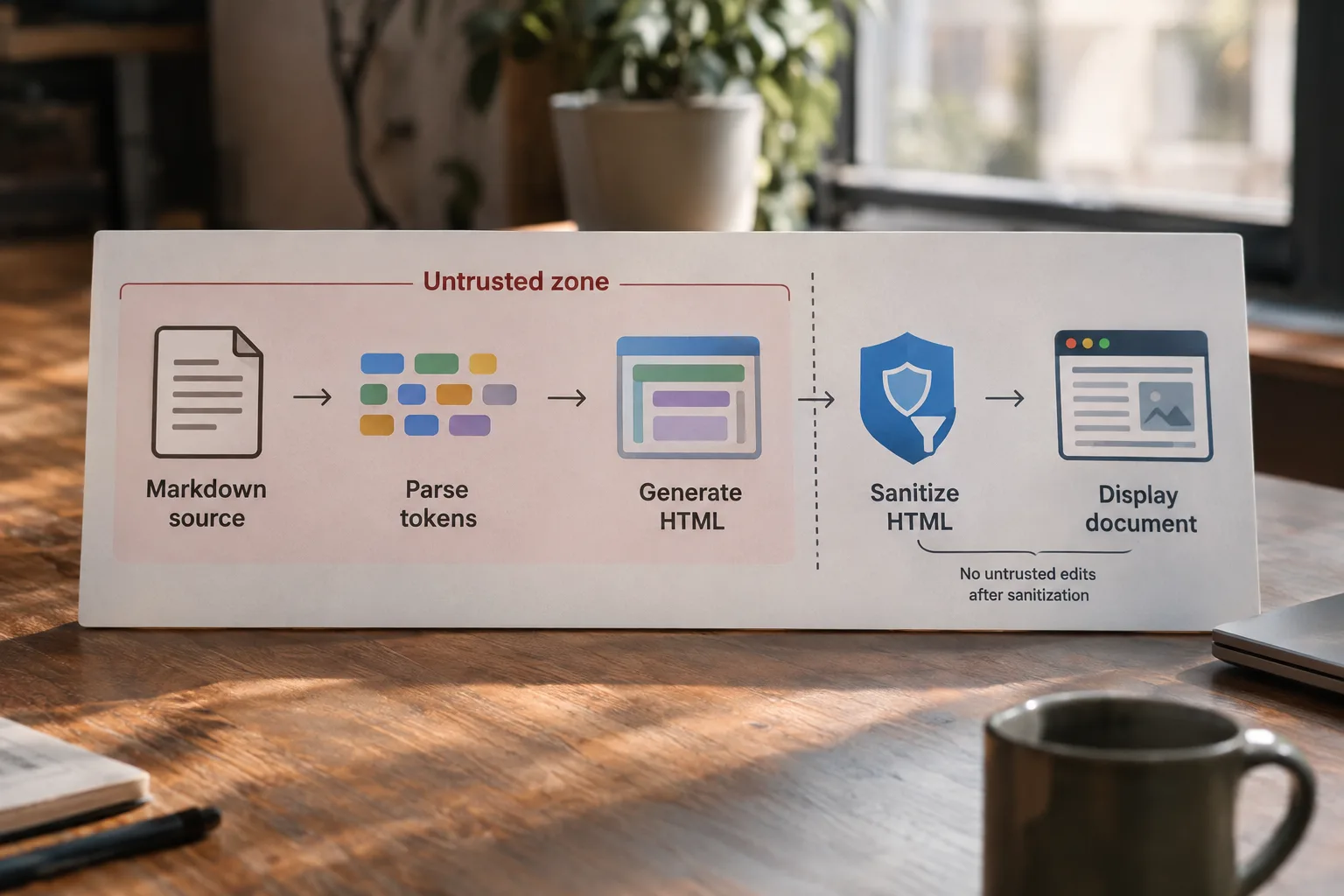
For this implementation, I use a deliberately restricted policy:
| Feature | Policy |
|---|---|
| Headings, paragraphs, lists, emphasis, quotations | Allow their corresponding HTML elements |
| Raw HTML in Markdown | Display as literal text rather than interpret as markup |
| Links | Allow HTTP, HTTPS, mail links, and relative references; reject protocol-relative URLs |
| Fenced code blocks | Preserve escaped text and language classes |
| Images, embedded documents, scripts, inline styles | Exclude from the generated HTML fragment |
| Tables, task lists, diagrams, executable components | Do not enable extensions in this example |
These are application choices, not a universal Markdown specification. Record them beside your renderer so an editor preview and a published document do not quietly support different features.
Check: prepare a heading, a normal link, a fenced code block, and a raw HTML tag as fixtures. If a required feature depends on an extension, name and review that extension before enabling it. Do not switch on every plugin merely to make one document look right.
2. Install matching dependencies and TypeScript tooling
Start in a new directory outside the framework repository. Replace the two tarball paths with the matching files you received. The preview filenames and installation sequence follow the db3.ai installation documentation.
mkdir markdown-rendering-demo
cd markdown-rendering-demo
npm init -y
npm pkg set type=module
npm pkg set private=true --json
npm install /path/to/db3.ai-pure-0.1.0.tgz /path/to/db3.ai-app-0.1.0.tgz
npm install fastify@5 [email protected] [email protected]
npm install -D typescript@6 tsx@4 @types/node@24 @types/[email protected]
mkdir -p src tests
The parser and sanitizer versions are explicit example pins, verified against their Markdown parser metadata and sanitizer package metadata. They are not a promise that these versions should remain pinned indefinitely. Review security updates and rerun your fixtures when upgrading.
Save this as tsconfig.json. In particular, esModuleInterop supports the sanitizer's documented default import, and allowImportingTsExtensions supports the local TypeScript imports used by this no-emit example.
{
  "compilerOptions": {
    "target": "ES2022",
    "module": "ESNext",
    "moduleResolution": "Bundler",
    "strict": true,
    "noEmit": true,
    "esModuleInterop": true,
    "allowImportingTsExtensions": true,
    "types": ["node"],
    "skipLibCheck": true
  },
  "include": ["src/**/*.ts", "tests/**/*.ts"]
}
Check: installation should complete before you add application code. An npm 404 for the unreleased db3.ai package is not a reason to substitute a similarly named package. Confirm the supplied tarballs exist and match each other. The sanitize-html documentation explains its separate TypeScript definitions and import requirements.
3. Generate HTML, then sanitize the complete fragment
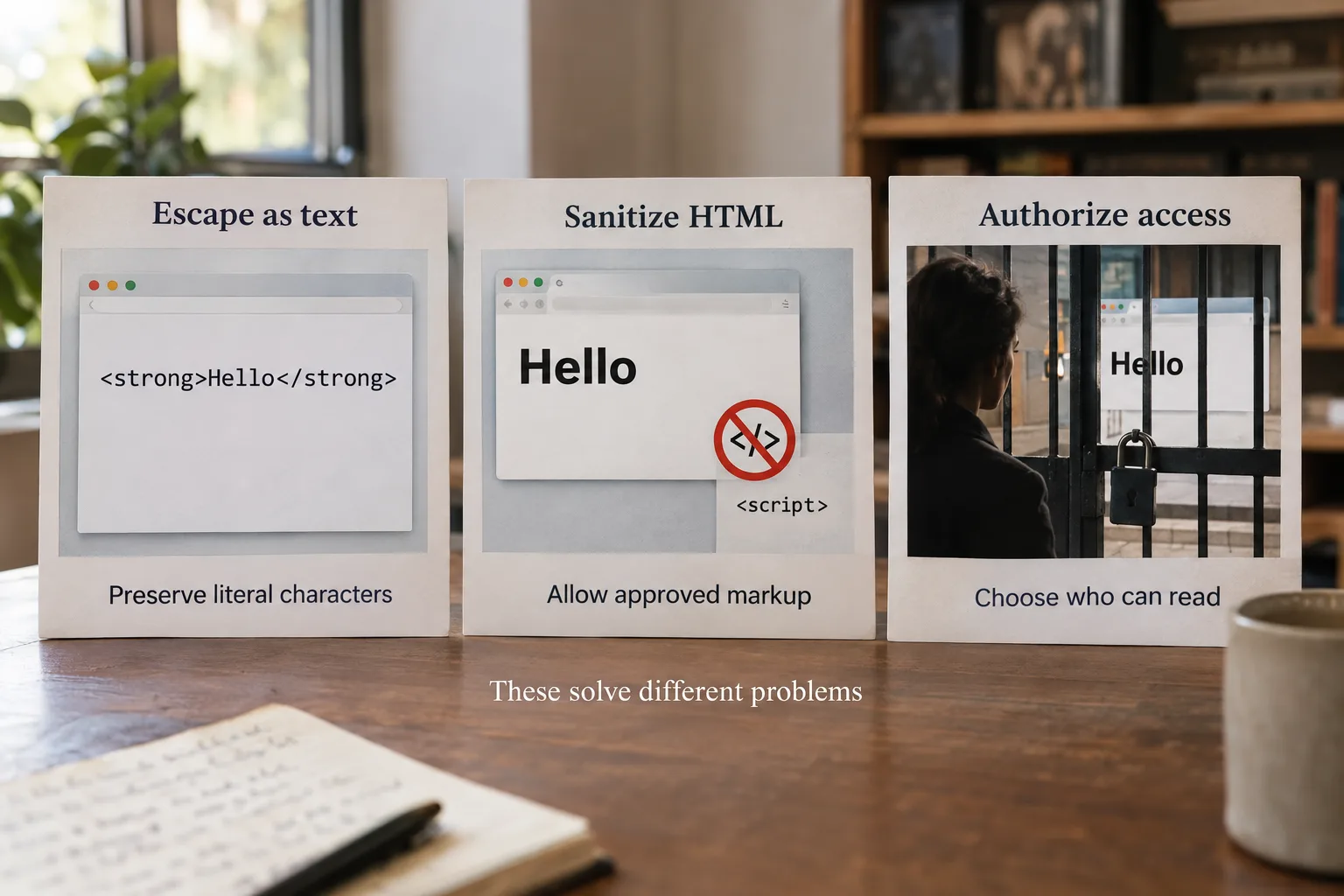
Escaping and sanitizing solve different problems. Escaping preserves characters as text, so a tag can be shown rather than interpreted. Sanitizing preserves permitted markup while removing disallowed elements, attributes, or URL values. Neither decides who may read the document. OWASP's XSS prevention guidance distinguishes output encoding, HTML sanitization, and the context into which data is inserted.
Save the following as src/renderMarkdown.ts. The CommonMark preset and constructor options follow the version-specific markdown-it usage documentation and parser implementation. The sanitizer configuration uses the published options documented for its pinned source revision.
import MarkdownIt from 'markdown-it';
import sanitizeHtml from 'sanitize-html';

const MAX_MARKDOWN_LENGTH = 100_000;

const markdown = new MarkdownIt('commonmark', {
  html: false,
  linkify: false,
  breaks: false,
  maxNesting: 32,
});

export function renderMarkdown(input: unknown): string {
  if (typeof input !== 'string') {
    throw new TypeError('Markdown must be a string.');
  }
  if (input.length > MAX_MARKDOWN_LENGTH) {
    throw new RangeError('Markdown exceeds the document limit.');
  }

  const generatedHtml = markdown.render(input);

  return sanitizeHtml(generatedHtml, {
    allowedTags: [
      'h1', 'h2', 'h3', 'h4', 'h5', 'h6',
      'p', 'br', 'hr', 'blockquote',
      'ul', 'ol', 'li', 'strong', 'em',
      'a', 'pre', 'code',
    ],
    allowedAttributes: {
      a: ['href', 'title'],
      ol: ['start'],
      code: ['class'],
    },
    allowedClasses: {
      code: ['language-*'],
    },
    allowedSchemes: ['http', 'https', 'mailto'],
    allowProtocolRelative: false,
  });
}
The size threshold is an example product limit measured in JavaScript string code units, not transport bytes. Reject oversized request bodies at your HTTP boundary too. A nesting limit and document limit are useful constraints, but neither establishes a universal execution-time guarantee.
For **Hello**, the expected result is:
<p><strong>Hello</strong></p>
There is also a trailing newline. Raw HTML remains escaped text; Markdown image output is removed because img is not permitted. Communicate those restrictions to authors rather than silently promising full GitHub-style rendering.
The markdown-it safety guide recommends keeping HTML disabled and already blocks several dangerous URL schemes. Our sanitizer is an additional application policy boundary, not a claim that the parser has no safeguards. Be explicit about html: false: the options reference notes that the CommonMark preset otherwise enables HTML.
Scheme filtering is not a phishing filter or a destination allowlist. An HTTPS link can still lead somewhere inappropriate. If your product permits only approved destinations, add a separately reviewed destination policy before final sanitization. Relative references also resolve against the delivered page URL, so test them from the actual route.
Check: a normal link should retain its href; a protocol-relative link should not. If formatting disappears, inspect the generated fragment and the allowlist separately. Do not “fix” missing output by permitting every tag or attribute.
4. Display the fragment through a db3.ai HTML route
The db3.ai SSR renderer accepts application HTML through appHtml; it does not sanitize arbitrary HTML for you. Its SSR guide and API reference document the imports, template marker, route configuration, and render-result fields used below.
Save this as src/createMarkdownServer.ts:
import Fastify from 'fastify';
import { SSR_APP_MARKER } from '@db3.ai/app/ssr';
import { fastifySsr } from '@db3.ai/app/ssr/fastify';
import { renderMarkdown } from './renderMarkdown.ts';

export async function createMarkdownServer(source: string) {
  const server = Fastify({ logger: false });
  const template = `<!doctype html>
<html lang="en">
<head><meta charset="utf-8"><title>Markdown example</title></head>
<body>${SSR_APP_MARKER}</body>
</html>`;

  await server.register(fastifySsr({
    template,
    routes: ['/markdown'],
    async render() {
      const safeHtml = renderMarkdown(source);
      return {
        appHtml: `<main><article>${safeHtml}</article></main>`,
        headers: { 'Cache-Control': 'private, no-store' },
      };
    },
  }));

  return server;
}
Only the sanitized fragment enters the trusted, fixed wrapper. No source text is interpolated into an attribute, inline script, or stylesheet. The document intentionally has no hydration state or client-side framework setup; the SSR API permits those markers to be omitted for a non-hydrating document.
For a local browser check, save src/start.ts:
import { createMarkdownServer } from './createMarkdownServer.ts';

const server = await createMarkdownServer(
  '# Hello team\n\nRead this **formatted** document.',
);
await server.listen({ port: 3000, host: '127.0.0.1' });
Run npx tsx src/start.ts, then open http://127.0.0.1:3000/markdown. Expect a heading and an emphasized word. If the port is occupied, stop the other process or change the example port. The factory/listener separation follows Fastify's testing guide, allowing HTTP checks without opening a socket.
This fixture is public and identical for every visitor. Production persistence, authentication, request-specific authorization, upload handling, shutdown hooks, and deployment configuration are deliberately omitted. For private documents, load and authorize the requested record within the request flow before rendering it. Do not replace the fixture with a shared mutable “current user's document” variable.
If your browser application instead inserts an HTML string into an existing DOM, keep that insertion inside one reviewed component. Use a text API for a source-code panel, not for a formatted preview. Do not concatenate raw content after sanitization; OWASP specifically warns that later mutation can invalidate the protection. A sanitized body fragment is not automatically appropriate inside a script, URL, or attribute.
5. Verify valid documents, hostile input, and HTTP behavior
A screenshot of a working heading is not enough. Check the renderer and the final document response. The following smoke checks use Node's strict assertions and Fastify's documented inject() method. Save them as tests/markdown.check.ts:
import assert from 'node:assert/strict';
import { renderMarkdown } from '../src/renderMarkdown.ts';
import { createMarkdownServer } from '../src/createMarkdownServer.ts';
assert.equal(renderMarkdown(''), '');
assert.equal(
renderMarkdown('**Hello**'),
'<p><strong>Hello</strong></p>\n',
);
assert.throws(() => renderMarkdown(null), TypeError);
assert.throws(() => renderMarkdown('x'.repeat(100_001)), RangeError);
const hostileInputs = [
'<' + 'img src=x onerror=alert(1)>',
'<svg onload=alert(1)></svg>',
'[bad](javascript:alert%281%29)',
'[encoded](javascript:alert%281%29)',
'[network](//untrusted.example/path)',
'!' + '[pixel](https://untrusted.example/pixel.png)',
];
for (const input of hostileInputs) {
const html = renderMarkdown(input);
assert.ok(!/<(?:script|img|svg)\b/i.test(html));
assert.ok(!/href="(?:javascript:|data:|\/\/)/i.test(html));
}
const code = renderMarkdown(
'```html\n<script>alert(1)</script>\n```',
);
assert.ok(code.includes('<script>'));
assert.ok(code.includes('class="language-html"'));
assert.ok(renderMarkdown('[Docs](/docs)').includes('href="/docs"'));
const server = await createMarkdownServer('# Hello team');
try {
const response = await server.inject('/markdown');
assert.equal(response.statusCode, 200);
assert.ok(response.body.includes('<h1>Hello team</h1>'));
assert.equal(response.headers['cache-control'], 'private, no-store');
assert.equal((await server.inject('/api/missing')).statusCode, 404);
} finally {
await server.close();
}
console.log('Markdown smoke checks passed.');
Run the checks and type analysis:
npx tsc --noEmit
npx tsx tests/markdown.check.ts
The success message is the expected outcome, not a recorded test result. These assertions are examples, not a complete XSS test suite. Their regular expressions inspect specific output properties; they are not sanitizers and should never become your content-cleaning implementation.
Add regression fixtures for malformed HTML, mixed-case and entity-encoded schemes, very long lines, unusual Unicode, and every plugin you adopt. The sanitizer's own regression tests illustrate why ordinary and encoded inputs both matter.
Then perform browser-level checks: confirm disallowed inputs create no active elements, code samples remain text, links resolve as intended, and keyboard users can navigate the result. Inspect the DOM and network activity, not merely whether an alert appeared. A Content Security Policy may suppress one symptom without proving that the fragment satisfies your policy.
Troubleshooting: a visible escaped tag is expected when raw HTML is disabled. Missing syntax color is expected too: the markdown-it renderer supplies escaped code and language classes, but this example installs no highlighter or theme. If you add highlighting, run it before the final sanitization and review any newly required elements and classes.
6. Choose where rendering runs and keep the policy consistent
I would start with server-side rendering for a stored document feature like this one. It gives the application one place to apply its input and HTML policies before returning a document. That is an architectural recommendation, not a requirement of Markdown itself.
| Location | Useful when | Boundary to verify |
|---|---|---|
| Build time | Repository content changes through a publishing workflow | Rebuild when source, renderer, or sanitizer policy changes |
| Server request | Content or access depends on current application state | Authorize before returning content and avoid cross-user caches |
| Browser | An editor needs an immediate local preview | Apply a reviewed preview policy; never treat browser output as server-validated |
The sanitizer documentation explicitly warns that servers must not trust browser-side sanitization. If you add a live preview, make the accepted syntax and URL policy match the published view, and validate the original source again on the server. A successful preview is not evidence that the saved representation is safe.
Keep original Markdown as the editable source of truth. If you cache generated HTML, I recommend keying it by document revision, renderer version, plugin configuration, and sanitizer-policy version. Invalidate the cache when any of those change. Authorization and tenant identity must remain part of the delivery decision even when the cached fragment is reusable.
For concurrency, configure the parser once and leave it unchanged during requests. The parser source recommends separate instances for different configurations rather than changing options on the fly. Do not attach user state to the shared instance or install request-specific plugins. Parsing and sanitization here are synchronous, so benchmark representative large documents and simultaneous requests before choosing caching or worker offloading.
Check: publish and preview the same fixture through every supported path. Differences in tables, line breaks, links, or code blocks usually indicate different configurations or missing presentation assets. Resolve that drift before adding another extension.
FAQ
Is Markdown rendering safe without a sanitizer?
It depends on the renderer and configuration. markdown-it documents a safe default approach with HTML disabled and link validation enabled. This guide also sanitizes the generated fragment to enforce a narrower application policy. Raw HTML, plugins, custom render rules, and later transformations all deserve separate review; the word “Markdown” alone is not a security guarantee.
Why does my application show HTML tags instead of formatting?
You may be displaying the generated string through a text-rendering API, or escaping it a second time. That is correct for showing source, but not for a formatted preview. Keep source display and sanitized HTML display as distinct operations rather than disabling escaping throughout the application.
Does sanitization make AI-generated Markdown trustworthy?
No. I would send model output through the same untrusted-content pipeline as user input. Sanitization constrains browser markup; it does not establish factual accuracy, grant permissions, approve destinations, or make instructions embedded in a document safe to execute.
Put the boundary into your application
The completed feature is a bounded Markdown-to-HTML renderer with an explicit policy, a db3.ai document route, and repeatable checks. The most useful next action is to replace the public fixture with one authorized document-loading path, keeping the renderer unchanged.
Use the db3.ai SSR walkthrough to align that route with your installed preview. Run the checks, inspect the browser result, and only then expand the supported Markdown features.
Sources
- markdown-it 15.0.3: Usage examples
- markdown-it: Options reference
- markdown-it 15.0.3: Safety guidance
- markdown-it 15.0.3: Parser source and HTML renderer source
- sanitize-html: Version-pinned documentation and regression tests
- npm: markdown-it 15.0.3 metadata and sanitize-html package metadata
- OWASP: Cross Site Scripting Prevention Cheat Sheet
- db3.ai: Installation, SSR guide, and SSR API reference
- Fastify 5: Testing
- Node.js 24: Assert
Recommended Reads
- What Are Static Files? A Practical Guide to Serving Web Assets, for delivering the styles and scripts that turn generated HTML into a usable document.
- 7 Executable Code Examples That Demonstrate Complete Application Patterns, for evaluating setup instructions, application boundaries, and repeatable verification paths.