15 November 2026
How to Build a Secure Email Verification Link in TypeScript

TL;DR
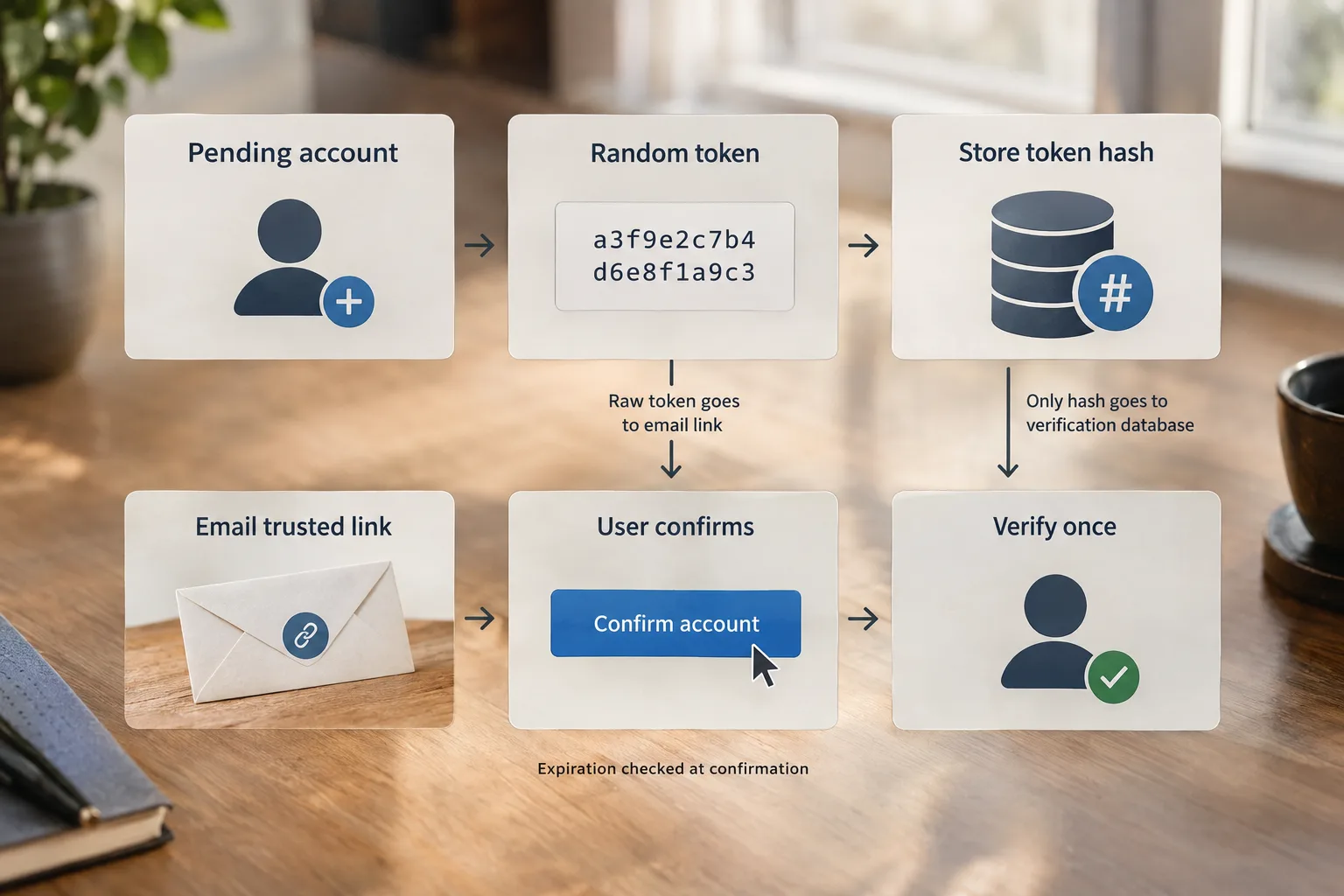
To build a secure email verification link, create a pending account, generate a random token, store its hash with an expiration, and email a URL on your trusted application origin. Opening the link should display a confirmation page, not change the account. On a deliberate confirmation request, validate and consume the token in the same transaction that marks the address verified. Below, we build the token and db3.ai mail example, then specify the application-owned transaction and tests.
An email verification feature crosses several boundaries: the registration request, your database, a mail provider, an email client, and a later browser session. A successful email send is not the completed outcome. The outcome is a server-side record showing that the intended account confirmed its current email address.
We will keep those responsibilities separate rather than present a mail helper as a complete authentication feature.
Table of contents
- Before you start
- 1. Define what the email verification link proves
- 2. Generate a purpose-bound token and store its hash
- 3. Construct the link from trusted application configuration
- 4. Preview the message, then implement a recoverable send
- 5. Make link opening read-only
- 6. Validate and consume the token atomically
- 7. Define resends, replacement, and address changes
- 8. Test the lifecycle against the real database
- Frequently asked questions
- Complete the first verified account
- Sources
- Recommended Reads
Before you start
You need:
- A TypeScript server and a pending-account authentication flow.
- A transactional database with account records and an application-owned verification table.
- A configured public HTTPS origin and permission to send from your chosen email domain.
- Shared abuse controls if several application instances serve requests.
- A private local mail-preview directory for development.
The examples follow Node.js 24 APIs and db3.ai's documented 0.1.0 preview installation. The installation guide currently requires matching App and Pure tarballs from a maintainer, rather than an npm-only installation. Use its development-tool setup before running these files.
Our code uses @db3.ai/app URL and Mail services. Persistence, HTTP routes, session checks, CSRF protection, and the delivery worker remain application code. The login-to-database walkthrough covers the existing session boundary; this guide adds address confirmation without repeating registration and login.
1. Define what the email verification link proves
A verification link demonstrates access to the message sent to an address. It does not establish a person's legal identity, make email a strong authentication factor, or grant permission to another user's records. OWASP's email identity guidance treats verification and broader account security separately.
Keep three checks distinct:
| Check | Question it answers | What remains unproven |
|---|---|---|
| Format validation | Does the address meet our accepted syntax? | Access to the mailbox |
| Delivery-related checks | Does the domain or mail infrastructure appear usable? | Whether this applicant can read the message |
| Link confirmation | Can the applicant return the emailed secret? | Real-world identity and ongoing mailbox control |
Format validation alone does not prove mailbox access, as the OWASP Input Validation Cheat Sheet explains. Do not substitute an address-checking API for confirmation.
For this design, create the account in a restricted pending state. Store emailVerifiedAt as null and maintain an emailVersion that changes whenever the address being verified changes. Pending sessions may access verification screens, not ordinary account privileges.
I recommend requiring the pending account's authenticated session on the final confirmation request. On another device, the user signs in normally before confirming. Reject a session belonging to a different account. This deliberately prevents a recipient from unknowingly activating an account whose password somebody else selected.
Do not overwrite an existing account's password during duplicate registration, and do not merge accounts merely because their email strings match.
Check: Register a test account and confirm that email-dependent privileges remain unavailable. If they are already accessible, fix the authorization gate before implementing delivery.
2. Generate a purpose-bound token and store its hash
Use a cryptographically secure random generator, not a timestamp, account ID, or ordinary random-number helper. Node.js documents randomBytes() and createHash() for the operations below; its Buffer documentation defines hexadecimal encoding.
Save this as server/emailVerification.ts:
import { createHash, randomBytes } from 'node:crypto';

export const verificationLifetimeMs = 30 * 60 * 1000;

export function tokenDigest(input: unknown): string {
  if (
    typeof input !== 'string' ||
    input.length !== 64 ||
    !/^[0-9a-f]+$/.test(input)
  ) {
    throw new Error('Invalid verification token.');
  }

  return createHash('sha256')
    .update(`email-verification:v1:${input}`, 'utf8')
    .digest('hex');
}

export function createVerification(
  userId: string,
  emailVersion: number,
  now = new Date(),
) {
  const token = randomBytes(32).toString('hex');

  return {
    token,
    record: {
      userId,
      emailVersion,
      purpose: 'email-verification' as const,
      tokenHash: tokenDigest(token),
      expiresAt: new Date(now.getTime() + verificationLifetimeMs),
      usedAt: null,
      revokedAt: null,
    },
  };
}
This generates 32 random bytes, encoded as 64 hexadecimal characters. The 30-minute lifetime is an example policy, not a universal security requirement. Choose a window that accounts for your risk and expected delivery delays. OWASP recommends random, single-use, time-limited verification tokens, without prescribing this particular duration.
Persist record, not token, in the verification table. Use a unique index on tokenHash, a relationship to the account, and indexes supporting pending-token lookup and cleanup. Keep the purpose field even if verification currently has its own table: a password-reset credential must never be accepted here.
During issuance, lock the account, read its current address version, revoke any previous unused verification challenges, and insert the replacement in one transaction. Obtain the account ID and version from trusted application state, not submitted form fields.
Check: Two issued challenges should have different raw tokens. The verification row should contain neither the raw token nor a complete link.
The lifecycle separates the secret carried by email from the hash used for validation:
3. Construct the link from trusted application configuration
Never derive the emailed origin from an untrusted request Host header. OWASP's URL-token guidance, written for password recovery, also provides useful protections for this email-link design: use HTTPS and a trusted destination.
The db3.ai Application URLs guide supplies the canonical-origin mechanism. UrlGenerator accepts baseUrl, and to() resolves an application path. It is a URL resolver, not an automatic redirect allowlist.
Create server/verificationMail.ts:
import type { Mail } from '@db3.ai/app/mail';
import { UrlGenerator } from '@db3.ai/app/url';
import { tokenDigest } from './emailVerification';

export function verificationLink(
  urls: UrlGenerator,
  token: string,
): string {
  tokenDigest(token);
  const link = new URL(urls.to('/verify-email'));

  if (
    link.protocol !== 'https:' ||
    link.origin !== new URL(urls.baseUrl).origin
  ) {
    throw new Error('Verification requires the trusted HTTPS origin.');
  }

  link.searchParams.set('token', token);
  return link.href;
}

export async function sendVerification(
  mail: Mail,
  urls: UrlGenerator,
  storedEmail: string,
  token: string,
) {
  return mail.send({
    to: storedEmail,
    subject: 'Confirm your email address',
    text: [
      'Open this link, then choose Confirm email:',
      verificationLink(urls, token),
      'This link expires 30 minutes after it was requested.',
      'If you did not request this account, ignore this message.',
    ].join('\n\n'),
  });
}
The route is deliberately fixed at the origin root. If your application lives beneath a path prefix, adjust that application-owned route and test its deployed location. Do not accept an arbitrary destination from the requester.
The URL API reference establishes the framework signatures; Node.js URL documentation covers URL, origin, searchParams.set(), and serialization.
Check: Change a request's host to an unrelated domain. The generated link must still use your configured application origin. If it does not, inspect the configuration passed to the helper, not just its output.
4. Preview the message, then implement a recoverable send
The helper's storedEmail must come from the validated account record associated with the challenge. It is not permission to expose a public arbitrary-recipient send API. Keep recipient policy, address validation, and templates inside the application.
For a local example, create a private .private-mail-preview directory outside public assets and add it to your ignore rules. Save this as examples/previewEmailVerification.ts:
import { FileMailTransport, Mail } from '@db3.ai/app/mail';
import { UrlGenerator } from '@db3.ai/app/url';
import { createVerification } from '../server/emailVerification';
import { sendVerification } from '../server/verificationMail';

const urls = new UrlGenerator({
  baseUrl: 'https://app.example.test',
});

const mail = new Mail({
  from: 'Accounts <[email protected]>',
  transport: new FileMailTransport({
    directory: '.private-mail-preview',
  }),
});

const challenge = createVerification('preview-user', 1);

// Preview only: no database row or HTTP route is created here.
const delivery = await sendVerification(
  mail,
  urls,
  '[email protected]',
  challenge.token,
);

console.log({
  transport: delivery.transport,
  previewPath: delivery.path,
});
Run it from your configured project root:
npx tsx examples/previewEmailVerification.ts
The intended result is a file preview containing the fixed subject and trusted link, with no external email. The example domain is not a working verification service. Inspect the JSON privately, then remove it. The Mail guide documents file previews and warns that they contain plaintext message content.
Production has an additional handoff: the challenge must commit before a worker sends its link. If a crash between commit and send cannot be tolerated, write a delivery outbox entry in the same transaction. AWS's transactional outbox guidance explains this dual-write problem and the possibility of duplicate dispatch.
An outbox that can resend the same link necessarily retains access to the raw secret. Keep only the hash in the verification table, but encrypt any token-bearing outbox payload with separately managed keys. Restrict worker access and delete that payload after its retention window. Do not put reusable plaintext links into broadly readable job records.
The Mail API contract distinguishes provider acceptance from inbox delivery and leaves retries to the application. Track submission failures separately from verification failures. A timeout can be ambiguous, so do not assume that retrying a send is harmless or exactly once.
5. Make link opening read-only
Email security scanners can follow links before the recipient does. Auth0 explicitly documents accidental verification by email scanners. Consuming the token during the initial page request can therefore make a legitimate user's link appear already used.
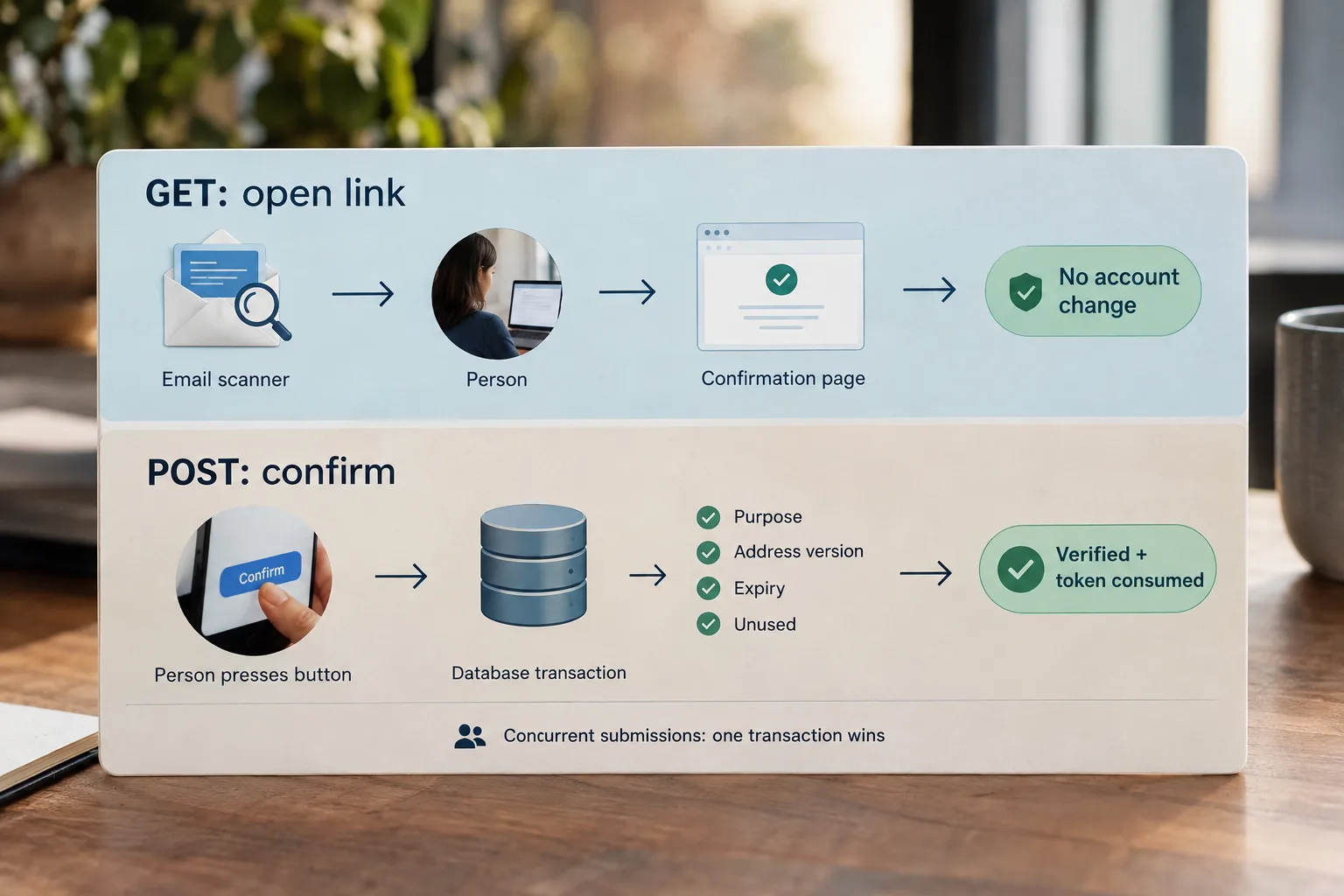
Use two separate operations:
GET /verify-email?token=...displays a confirmation screen without consuming the token or activating the account.- A deliberate
POSTsubmits confirmation after the pending-account session and request-origin or CSRF checks succeed.
Do not auto-submit the confirmation request when the page loads. A button reduces accidental consumption, but it is not proof that all automated clients are human. Keep the authenticated-account binding and server-side validation.
The separation should be visible in both the route design and the database tests:
For the landing page, send Cache-Control: no-store and Referrer-Policy: no-referrer. Avoid third-party analytics, external images, and tracking redirects on that screen. OWASP's URL-token guidance recommends protecting against referrer leakage.
Strip query strings from access logs, tracing, error reports, and support captures for this route. If signing in on a second device, retain the pending challenge through a protected application mechanism, not an external login redirect containing the raw link.
Check: Simulate GET and HEAD requests from a scanner. Neither may change emailVerifiedAt, consume a challenge, or create a signed-in session.
6. Validate and consume the token atomically
A sequence of independent read, check, and update calls is insufficient. Two requests can both observe an unused token before either records consumption.
Serialize verification-related changes through the account row. MariaDB's FOR UPDATE documentation explains that effective locking requires a transaction or disabled autocommit. Use the transaction and locking behavior of your actual database driver.
The following is application-owned pseudocode, not a db3.ai API:
Validate the submitted token's type, length, and character set
Derive its purpose-prefixed hash using tokenDigest
Require the pending-account session and CSRF/origin protection

BEGIN TRANSACTION
  Lock the account identified by the trusted session
  Lock the challenge matching that account and token hash
  Read a fresh authoritative time after acquiring locks

  Require the challenge to exist
  Require purpose = email-verification
  Require challenge.emailVersion = account.emailVersion
  Require usedAt and revokedAt to be null
  Require expiresAt > authoritative time
  Require the account to remain pending verification

  Mark the challenge used
  Set account.emailVerifiedAt
  Revoke other pending challenges for the same address version
COMMIT

Return confirmation without issuing a new login credential
Every issuance, resend, email change, and confirmation path must use the same account-first locking order. Otherwise, a resend could race with confirmation despite each endpoint having its own transaction.
Check expiration after waiting for locks. A request that arrived before expiry must not succeed merely because it spent several seconds blocked. Define expiry precisely: in this design, a token whose expiry equals the validation time is expired.
If either account verification or challenge consumption fails, roll back both. Retry only bounded, recognized transaction conflicts, and keep network email calls outside the transaction. Any post-verification event that must survive a crash needs its own atomic handoff.
Check: Submit the same valid token concurrently using the same pending account. Exactly one transaction may perform the transition. A second request can show a safe already-completed result, but it must not repeat privileged side effects.
7. Define resends, replacement, and address changes
For this implementation, a resend issues a new challenge and revokes the previous unused one. Explain the rule in the interface: use the newest verification email. Inbox arrival order is not a reliable version indicator.
Enforce the resend cooldown while holding the account lock so simultaneous clicks cannot each bypass it. Add shared per-account, per-address, and network-level limits appropriate to your abuse model. Do not reset an attacker's limit merely because a new application instance receives the next request.
Distinguish these situations:
- Duplicate request: An application-owned request identity can return the existing issuance result rather than generate another email.
- Transport retry: Retry the same issuance, without silently extending its expiry.
- User-requested resend: Create a replacement challenge under your cooldown policy.
- Delayed worker: Recheck that the challenge remains current and unexpired before submitting its message.
A replacement can still occur after that worker check but before provider acceptance. Accept that an older email may arrive, and make the validation result understandable. A worker cannot unsend a message already accepted by the provider.
If delivery fails after replacement, leave the account pending and recover the current issuance. Do not silently reactivate its predecessor. For a public resend endpoint, use a neutral response such as: “If this account is eligible, we will send a verification email.” Keep response timing and failure behavior from revealing account existence, following OWASP's emailed-token request guidance.
Treat address changes as a separate sensitive workflow: require reauthentication, notify the old address, and confirm the new one. OWASP's email-change recommendations support those controls. Use a pending new address rather than replacing a working recovery address immediately, and invalidate challenges for older address versions.
8. Test the lifecycle against the real database
A mail preview checks message construction. It does not establish transaction safety, session isolation, or delivery recovery. The complete implementation needs integration tests using the database engine and deployment topology you intend to operate.
Use a controlled clock and synthetic accounts. For the helper, pass a fixed Date into createVerification() and check that expiry is exactly 30 minutes later. For confirmation, exercise the database's authoritative-time boundary rather than relying only on a mocked application clock.
| Scenario | Expected result |
|---|---|
| Valid token, matching pending session | One account transition and one consumption |
| Missing, oversized, non-string, or malformed token | Rejected before verification lookup |
| Expired token, including exact expiry boundary | No account change |
| Previously used or revoked token | No second transition or side effect |
| Token replaced by resend | Earlier token rejected; current one eligible |
| Address version changed | Old challenge cannot verify the replacement address |
| Different account's session | No verification of either account |
| Scanner GET or HEAD | No account-state mutation |
| Concurrent confirmation requests | At most one transition commits |
| Confirmation racing with resend | One serialized ordering, with consistent resulting state |
| Failure between the two database updates | Both updates roll back |
| Provider rejection or worker crash | Account stays pending; delivery failure is recoverable |
| Queue delay beyond expiry | Worker does not submit a knowingly expired link |
| Forged request host | Emailed origin remains the configured origin |
Add an HTTP-level test for missing and foreign origins, plus a cross-user test that tries to supply a different account ID. The server should ignore client-selected identity fields rather than merely compare them in the browser.
For operational visibility, record an issuance ID, internal account reference, attempt category, timestamps, and result. Restrict access and avoid full addresses where they are unnecessary. OWASP's logging recommendations prohibit logging verification tokens and complete verification URLs.
Cleanup is separate from enforcement. A scheduled task may remove expired challenges and old delivery payloads, but confirmation must reject expiry even when cleanup has not run. Alert on growing delivery backlogs and repeated replacement requests, not just successful mail API responses.
Frequently asked questions
Why does an email verification link stop working?
It may have expired, been used, been replaced by a resend, or belong to an older address version. This design also requires the matching pending-account session. Offer a safe resend or sign-in action without exposing another account's details.
Should verification automatically sign the user in?
Not in this design. Confirmation changes an address-verification record; normal authentication establishes the session. Keeping them separate prevents a verification credential from quietly becoming a login credential.
Complete the first verified account
Your completed flow should leave one durable account verification timestamp and one consumed challenge, with a recoverable delivery history and no raw link in ordinary logs.
Start by running the local preview, then implement the locked persistence boundary and failure tests in your application. Use the db3.ai Mail guide for transport configuration and the authentication walkthrough for session integration. Do not enable verified-only product privileges until those boundaries pass together.
Sources
- OWASP: Email Validation and Verification
- OWASP: Input Validation
- OWASP: Forgot Password, including emailed URL-token controls
- Node.js 24: Crypto, Buffer, and URL
- Auth0: Verify Emails
- MariaDB: FOR UPDATE
- AWS: Transactional Outbox Pattern
- db3.ai: Installation and login-to-database walkthrough
- db3.ai: Application URLs and URL API reference
- db3.ai: Mail guide and Mail API reference
Recommended Reads
- 4 TypeScript Authentication Frameworks Compared: Sessions, Permissions, and Backend Fit: Evaluate the authentication and authorization boundaries around email confirmation.
- Backend Workflow Automation: Compare Queues, Schedulers, Workflow Engines, and Integrated Runtimes: Plan durable email work, retries, and recovery beyond the request handler.