4 November 2026
Fetch Table Explained: SQL SELECT, FETCH, and TypeScript

TL;DR
To fetch table data, start with SELECT when you need rows from a database table. A standalone SQL FETCH commonly retrieves rows through an existing cursor; FETCH FIRST inside a query can instead limit its output. JavaScript fetch() makes an HTTP request. We explain those boundaries, then show a scoped, bounded db3.ai query that returns data for an application table.
Searching for “fetch table” leaves an important question unanswered: do you mean retrieving database records, displaying an HTML table, or locating something actually named Fetch? The phrase can also refer to a force-fetch dog-training table, which is a separate, nontechnical subject.
For TypeScript product teams, the useful starting point is identifying which layer needs to retrieve what. A database table, a query result, and a table on screen are different things. We will keep them separate rather than treating every operation called “fetch” as the same API.
Table of contents
- What does “fetch table” mean in your application?
- Use SELECT to retrieve rows from a table
- FETCH has two distinct SQL uses
- Fetch table data with db3.ai ActiveRecord
- From returned records to a visible table
- Diagnose empty, slow, or inconsistent results
- Sources
- Recommended Reads
What does “fetch table” mean in your application?
Use the surrounding code or product name to identify the task:
| Your task | The operation to investigate |
|---|---|
| Read matching rows from a database table | A SELECT query or your model’s query API |
| Advance through an already-declared SQL cursor | The database’s cursor FETCH statement |
| Return only part of a query’s output | Its row-limiting syntax, such as LIMIT or FETCH FIRST |
| Request data from a web endpoint | HTTP fetch(), followed by response handling |
| Find a table literally named Fetch | Your application’s schema, migrations, and database catalogue |
These are not interchangeable spellings. PostgreSQL’s SELECT reference describes querying and row limits, while its FETCH reference describes cursor retrieval. MDN’s Fetch API guide covers HTTP requests, not SQL execution.
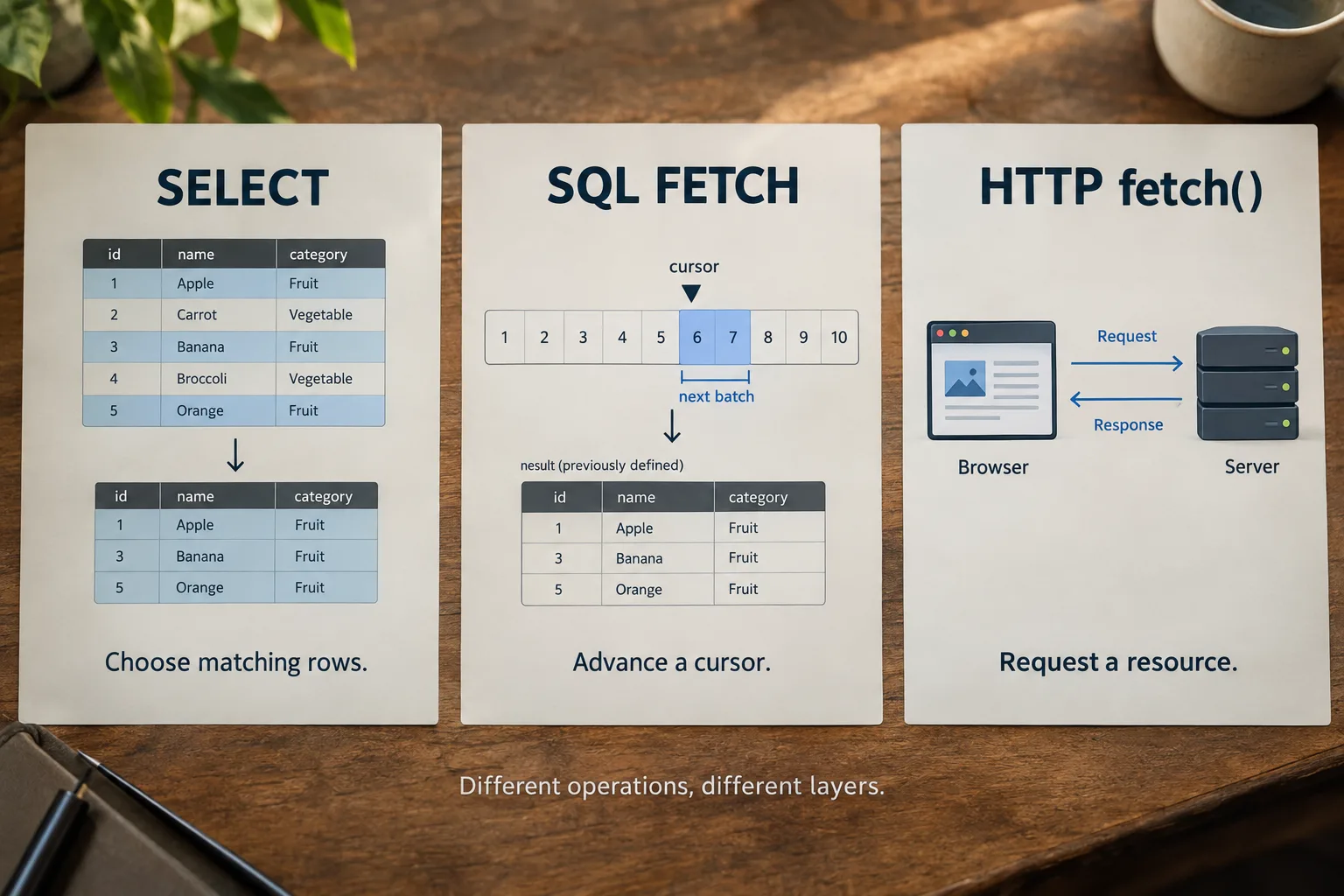
A useful debugging question is: Do I need to choose records, consume an existing result, or request a resource from another layer? Answer that before searching for a method named fetchTable.
Use SELECT to retrieve rows from a table
For the standalone SQL illustrations below, assume PostgreSQL 18 and an existing knowledge_notes table containing id, title, and workspace_id, with a unique id. You need permission to read those columns. These examples explain SQL terminology; the db3.ai example later uses its documented MariaDB/MySQL environment.
SELECT id, title
FROM knowledge_notes
WHERE workspace_id = 'demo-workspace'
ORDER BY title ASC, id ASC
LIMIT 25;
This query specifies the output columns, identifies the source table, filters to one workspace, establishes an order, and returns at most 25 rows. Fewer matches produce fewer rows. The result is a set of selected records, not a copy of the entire database table. PostgreSQL documents these SELECT components.
The unique id breaks ties between equal titles. Without a uniquely determined order, asking for the “first 25” does not identify a predictable subset. PostgreSQL specifically recommends ordering when applying limits and warns that large offsets can be inefficient because skipped rows still require work. See its LIMIT and OFFSET guidance.
In an application, replace the illustrative workspace literal with a bound value through your database library. Do not assemble raw SQL by interpolating request text. db3.ai’s query guide makes parameter binding and authorization explicit responsibilities at its raw-SQL boundary.
If the table is literally named Fetch
A name alone cannot identify your database object. Check the application, connection, schema, migration files, and actual identifier before writing a query. PostgreSQL’s FROM clause accepts an existing table or view, optionally qualified by schema; it does not discover a table from an English search phrase. The FROM reference explains that distinction.
We would first confirm whether “Fetch” is a product name, an application-specific table, or simply someone’s shorthand for reading data. Do not substitute a plausible table name into production SQL just to make an example run.
FETCH has two distinct SQL uses
A cursor FETCH consumes a previously defined result
A cursor gives retrieval a position within a query’s results. In PostgreSQL 18, a standalone FETCH advances or otherwise navigates that cursor and returns the requested rows. It does not replace the query that defines the result. PostgreSQL’s FETCH documentation specifies the supported directions and counts.
Here is a forward-only example for the same illustrative table:
BEGIN;

DECLARE note_rows NO SCROLL CURSOR FOR
    SELECT id, title
    FROM knowledge_notes
    WHERE workspace_id = 'demo-workspace'
    ORDER BY title ASC, id ASC;

FETCH FORWARD 25 FROM note_rows;
FETCH FORWARD 25 FROM note_rows;

CLOSE note_rows;
COMMIT;
The second fetch requests the next batch, rather than rerunning a query for its first page. Either batch may contain fewer than 25 rows when the result is exhausted.
Run this sequence in one session. PostgreSQL opens this SQL-level cursor when it is declared, and an ordinary cursor without WITH HOLD belongs to its transaction. If the sequence fails, roll back rather than continuing blindly. These lifecycle rules come from PostgreSQL’s DECLARE reference.
Do not copy that syntax into another engine without checking its documentation. For example, SQL Server’s Transact-SQL FETCH retrieves a specific cursor row, and available navigation depends on the cursor’s configuration.
FETCH FIRST limits a SELECT query
In PostgreSQL 18, the earlier query can end with FETCH FIRST 25 ROWS ONLY instead of LIMIT 25. Here, FETCH is part of the query’s row-limiting clause, not a standalone instruction addressing a named cursor. The SELECT syntax documents both forms.
Look at the complete statement, not the keyword alone. FETCH FORWARD 25 FROM note_rows and SELECT ... FETCH FIRST 25 ROWS ONLY solve different problems.
Fetch table data with db3.ai ActiveRecord
For an ordinary application list, we would begin with a bounded model query rather than introduce a SQL cursor. db3.ai’s ActiveRecord guide documents KnowledgeNote, its logical workspace field mapped to workspace_id, and the methods used below.
Setup: Use the matching preview @db3.ai/app and @db3.ai/pure packages, Node.js 24 or newer for the walkthrough, and a configured MariaDB/MySQL database. The installation guide currently specifies maintainer-supplied matching tarballs rather than assuming the packages are publicly installable from npm.
Copy the documented KnowledgeNote.ts model from the workspace-notes walkthrough, and place this function beside it. Your host must already boot its App and provide the model’s migrated table. Authentication, workspace-membership checks, HTTP routing, and UI rendering remain application-owned pieces; this is feature code, not a standalone server.
import { KnowledgeNote } from './KnowledgeNote';

export async function loadNoteTable(authorizedWorkspaceId: string) {
    const notes = await KnowledgeNote.where(
        'workspace',
        authorizedWorkspaceId,
    )
        .select('title')
        .orderBy('title', 'asc')
        .orderBy('id', 'asc')
        .limit(25)
        .all();

    const rows = notes.map(note => {
        if (note.id === null || note.title === null) {
            throw new Error('Expected persisted note fields.');
        }
        return { id: note.id, title: note.title };
    });

    return { rows };
}
The caller must supply a workspace identity it has already authorized, not blindly forward an ID from a URL or request body. This follows the workspace-notes guide’s explicit ownership boundary.
Here, where() builds the scoped query and all() executes it, returning model instances. select('title') requests the logical title field; the primary key is retained for model identity. We then consume those instances with map() and return only the two properties the table needs. The query guide documents selection, hydration, and bounds.
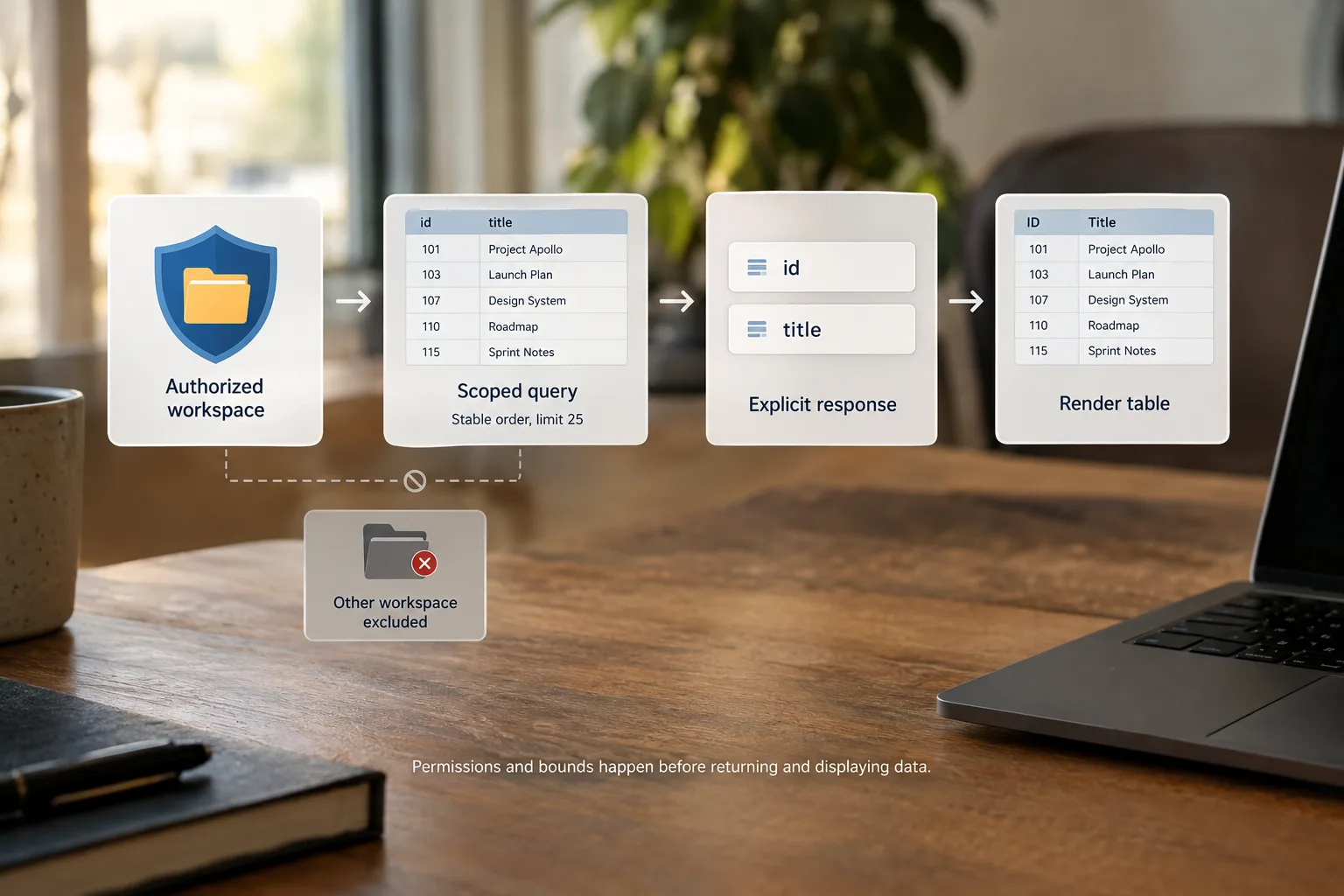
Do not serialize a partially selected model as though every property was loaded. An unselected value can appear null or default without proving that the stored column is empty. The explicit response keeps that ambiguity out of the UI contract. Also, the model’s required-string validation does not remove null from its TypeScript property type, which is why the example narrows the selected values. See the query cautions and ActiveRecord property-type guidance.
This function returns one bounded batch. It does not implement subsequent pages, total counts, cursor streaming, or a consistent snapshot across separate requests. Database failures should reach your host’s controlled error handling rather than become an empty success response. Type-check and exercise this adapted function against your matching preview packages; we have not executed it here.
From returned records to a visible table
The database read is only one part of a table feature. In a server-rendered application, pass the selected response to the view. In a browser application, an authenticated server endpoint can call the feature function and return its response; the browser then requests that endpoint.
JavaScript fetch() performs the HTTP request. Reading the response as JSON is a separate operation, and JSON parsing does not establish that the payload matches your intended row contract. MDN explains HTTP requests with fetch and the separate Response.json() parsing step.
For this example, configure the existing UI around two columns, ID and Title, and bind it to rows. Use the persisted id as row identity. Keep three outcomes visually distinct: still loading, a failed request, and a successful result containing no matching notes. None should be inferred merely from whether a table currently has visible rows.
The important boundary is that the browser receives an intentional response, not database credentials or unrestricted access to model queries. Adding a table component does not move authorization out of the server feature.
Diagnose empty, slow, or inconsistent results
Start with the layer where the failure occurs:
- No matching rows: Check the selected database, migrated table, and authorized workspace. In db3.ai, logical field names belong in normal model queries; physical column names belong at the SQL boundary. The ActiveRecord guide explains that mapping.
- Unexpected null properties: Check which fields were selected before assuming the stored record is incomplete. Partial models are not complete response objects. See the query guide’s selection cautions.
- Repeated or missing rows while paging: Establish a unique ordering first. That alone does not define what separate requests should observe when records change; decide your consistency requirements before adding pagination. PostgreSQL’s paging guidance explains the ordering requirement.
- Slow retrieval: Check whether the application loads every match or uses a deep offset. db3.ai documents that
all()hydrates matching rows, while PostgreSQL warns about large offset work. Start with bounds and inspect actual database behavior before changing abstractions. db3.ai queries and PostgreSQL limits describe those separate concerns.
We recommend starting with the smallest authorized read your screen needs. Use SELECT or a model query to choose records, a cursor only when its lifecycle fits the workload, and HTTP fetch() when crossing a web boundary. For a working db3.ai next step, follow the workspace-notes walkthrough, then adapt its scoped list to your own table contract.
Sources
- PostgreSQL 18: SELECT
- PostgreSQL 18: LIMIT and OFFSET
- PostgreSQL 18: FETCH
- PostgreSQL 18: DECLARE
- Microsoft Learn: FETCH, Transact-SQL
- MDN: Using the Fetch API
- MDN: Response.json()
- db3.ai: Installation
- db3.ai: ActiveRecord
- db3.ai: Query with logical fields
- db3.ai: Workspace notes walkthrough
Recommended Reads
- What Are Params? A TypeScript Guide to Function, Route, and Query Parameters: Understand and validate the inputs that select a record or page size.
- Database Seeder in TypeScript: Build Repeatable, Safe Seed Scripts: Prepare predictable records for isolated data-access checks.