4 November 2026
How to Inject Environment Variables to the Build Process Safely

TL;DR
Set environment variables before starting the build, validate required inputs, and read public values through your build tool's supported interface. For the Vite 7 example below, browser code uses import.meta.env.VITE_*. Treat those values as public. Keep credentials in trusted server runtime configuration, then verify the built artifact without printing secrets.
To inject environment variables to the build process, supply them in the environment of the command that actually builds your application. Supplying them only to the deployed server is a different operation.
That distinction matters when a TypeScript product includes both browser code and an AI-enabled backend. The browser needs a public API address; the backend may need a private provider credential. I keep those two configuration paths separate, even when they belong to one application.
This guide uses a version-scoped Vite 7 frontend example and a separate db3.ai server-side configuration probe. It is not a universal prefix convention for every TypeScript framework.
Table of contents
- Before you start
- 1. Decide which values belong in the build
- 2. Supply the variables before invoking the build
- 3. Validate inputs and use Vite's supported access mechanism
- 4. Verify the artifact without exposing credentials
- 5. Keep private configuration in the db3.ai server runtime
- 6. Release the matching artifact and troubleshoot mismatches
- Frequently asked questions
- Next step
- Sources
- Recommended Reads
Before you start
You will need:
- An existing Vite 7 TypeScript frontend with dependencies installed and an HTML entry that loads your browser entry module.
- Node.js 24 and npm for this walkthrough, plus Bash for the shell commands.
- A
buildscript that invokesvite build. Preserve any existing type-checking steps. - The application root as your working directory, with Vite's default environment directory.
- Permission to configure your CI variables if you follow the GitHub Actions example.
Check your lockfile before applying version-specific examples. Vite 7's getting-started guide covers installation and project structure. The optional db3.ai probe has separate preview-package prerequisites in step 5. The examples here were documentation-reviewed, not executed as part of this article.
1. Decide which values belong in the build
Start with a small configuration contract, not an unrestricted export of your environment.
| Example input | Intended consumer | Where I would supply it |
|---|---|---|
| Public API base URL | Browser application | Frontend build, if compiled into the bundle |
| Public release label | Browser diagnostic display | Frontend build |
| AI provider credential | Authorized server code | Server runtime or a secret-management integration |
| Database password | Database-using server process | Server runtime |
For Vite's default client exposure rules, a VITE_ prefix makes a variable eligible for browser access. It is a disclosure decision, not a protection mechanism. Vite documents that exposed values are bundled into client code.
The intended boundary is simple: public settings travel through the frontend build; private credentials travel directly to the trusted server process.
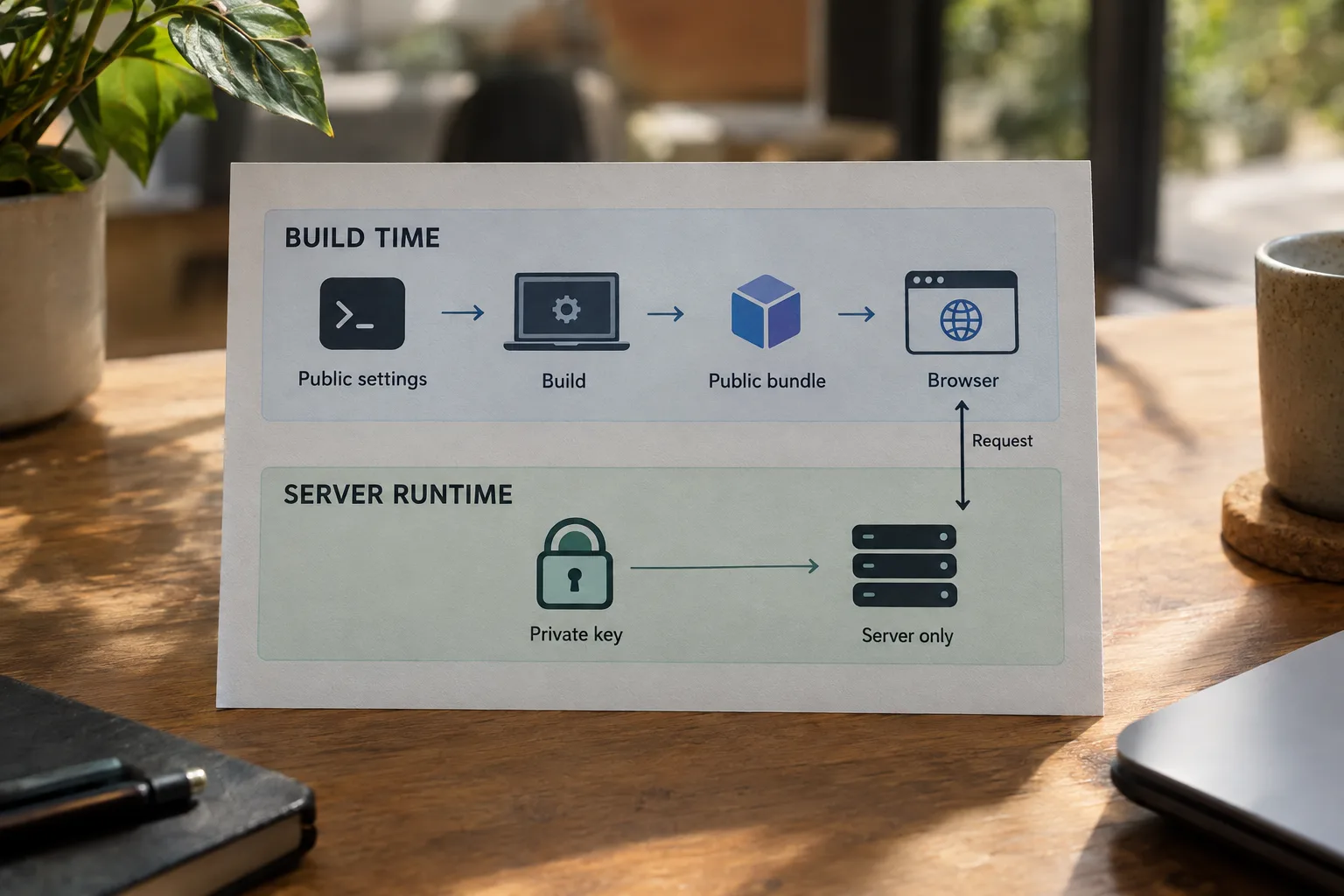
For our example, allow only VITE_API_BASE_URL and VITE_RELEASE_LABEL into the public configuration contract. Never rename a private provider key to give it a public prefix just because a browser component needs AI functionality. That component should call an appropriately authorized backend operation instead.
Check: You can explain why every public input is safe for someone to inspect. If you cannot, stop before wiring it into client code.
2. Supply the variables before invoking the build
In Bash, put assignments immediately before the command:
VITE_API_BASE_URL='https://api.staging.example.com' \
VITE_RELEASE_LABEL='staging-check-1' \
npm run build
These example values are public placeholders. Replace the address with your own public endpoint before testing real requests.
Bash's environment documentation establishes that assignments preceding a command become part of that command's environment. Alternatively, export values in the shell before launching the build. Setting them in an unrelated terminal, or after the build has started, does not configure that already-running command.
Use the actual build step in CI
For GitHub Actions, create the two repository configuration variables, then add this step excerpt under an existing job's steps:
- name: Build frontend with public configuration
  shell: bash
  env:
    VITE_API_BASE_URL: ${{ vars.VITE_API_BASE_URL }}
    VITE_RELEASE_LABEL: ${{ vars.VITE_RELEASE_LABEL }}
  run: npm run build
This assumes checkout, Node.js 24 setup, dependency installation, and the correct working directory are already handled. It does not upload or deploy the output. GitHub documents step-scoped env and the vars context; an unset configuration variable resolves to an empty string, which our next step rejects.
Use a release-specific label in a real pipeline so you can identify the artifact later. Do not assume a variable configured for a separate deployment job automatically reaches the build job.
Expected result: The build command receives both public inputs. An access or scope problem in CI should become a failed validation, not a silently misconfigured release.
3. Validate inputs and use Vite's supported access mechanism
Receiving a value is not the same as receiving a usable value. I prefer to reject missing configuration before generating a deployable artifact.
The following minimal vite.config.ts uses Vite 7's documented defineConfig callback and loadEnv API. Add these checks to your existing configuration rather than replacing framework plugins or other project options.
import { defineConfig, loadEnv } from 'vite';

export default defineConfig(({ command, mode }) => {
  if (command !== 'build') return {};

  const values = loadEnv(mode, process.cwd(), 'VITE_');
  const required = ['VITE_API_BASE_URL', 'VITE_RELEASE_LABEL'] as const;

  for (const name of required) {
    if (!values[name]?.trim()) {
      throw new Error(`${name} must be set before building`);
    }
  }

  try {
    const target = new URL(values.VITE_API_BASE_URL);
    if (
      !['http:', 'https:'].includes(target.protocol) ||
      target.username || target.password ||
      target.search || target.hash
    ) {
      throw new Error('Invalid public API address');
    }
  } catch {
    throw new Error(
      'VITE_API_BASE_URL must be an HTTP(S) URL without credentials, query, or fragment'
    );
  }

  console.log('Public build configuration: validated');
  return {};
});
The URL check uses the Node.js WHATWG URL API. It rejects credential-bearing URLs and token-like query strings without echoing the supplied address in an error. It does not prove the endpoint is reachable or approved for your environment. Add an explicit expected-origin check if your release policy requires one.
The build-only guard is intentional: previewing an existing artifact should not require reinjecting the inputs that originally produced it.
Read the public values in browser code
Add this temporary diagnostic to the browser entry module already loaded by your page:
const status = document.createElement('p');
status.textContent =
  `Release ${import.meta.env.VITE_RELEASE_LABEL}: ` +
  `API ${import.meta.env.VITE_API_BASE_URL}`;
document.body.append(status);
Vite's environment interface supplies these custom values as strings. Use explicit parsing for numbers or booleans; the string "false" is not a boolean false. Vite's client types must be included in your TypeScript project, as described in that guide. A type declaration is not a substitute for the build validation above.
This diagnostic displays only deliberately public configuration. It does not make an API request or implement authentication.
If you use Vite environment files
An alternative local input is a .env.staging.local file containing the same two public names. Select that mode with:
npx vite build --mode staging
The selected mode determines which mode-specific files Vite considers. Existing process variables take precedence over file values, so check the shell when an edit appears ineffective. These are Vite loading rules, not db3.ai runtime behavior.
Vite does not automatically populate .env values into process.env while evaluating its configuration file. That is why our config uses the documented loadEnv helper. Keep the helper's directory aligned with your actual root and envDir if your project customizes them.
4. Verify the artifact without exposing credentials
First, prove the failure path works. In a disposable local build, override one required input with an empty value:
VITE_API_BASE_URL='' \
VITE_RELEASE_LABEL='negative-check' \
npm run build
With the validation installed, expect a nonzero exit and an error naming the missing input. If the command succeeds, confirm it actually loads this Vite configuration and does not invoke a different workspace's build. Do not publish any output left from a previous successful run after this deliberate failure.
Then rerun the valid build from step 2. Preview that output with the installed Vite CLI:
npx vite preview
Open the address printed by the command and inspect the diagnostic paragraph. Vite documents preview as a local check of the built output, not a production server. The displayed label and API address should match the successful build, not whatever environment happens to exist when preview starts.
A useful release gate checks input validation, output creation, safe inspection, and deployed behavior separately.
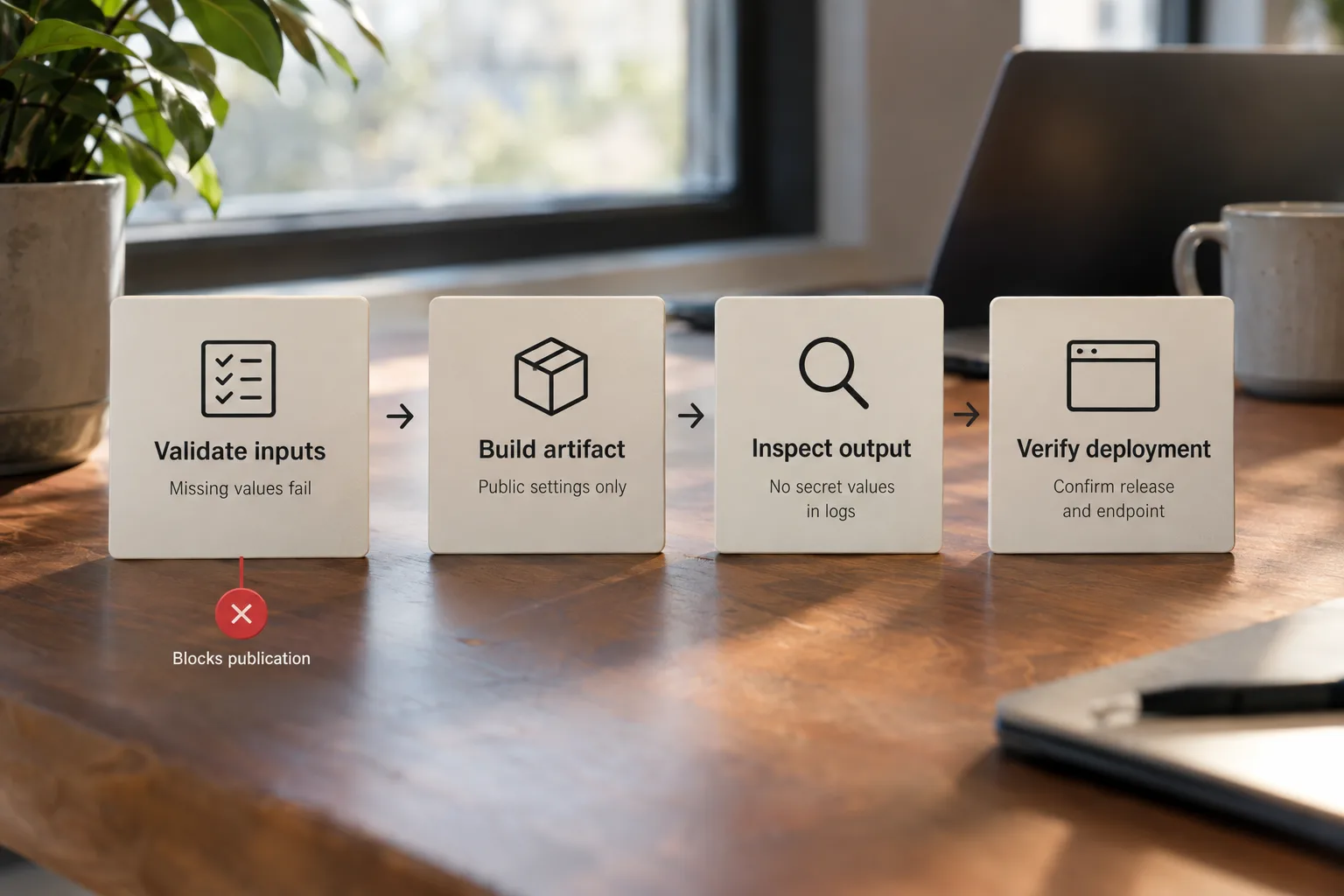
For private settings, log only a selected status such as providerKeyConfigured: true. Do not dump process.env, configuration objects, or credential-bearing request headers. OWASP's logging guidance identifies access tokens, passwords, and encryption keys as data to exclude from logs.
When inspecting artifacts, include browser chunks, generated HTML, source maps, and any generated public configuration files. Use secret-scanning tools with redacted reporting. Do not paste a real credential into a shared search command, screenshot, or CI diagnostic. A clean literal search alone is not proof that no secret escaped.
Finally, test a real application request in your deployed environment. A visible API address proves configuration reached the browser, not that routing, authorization, or cross-origin access works.
5. Keep private configuration in the db3.ai server runtime
The server has a different input boundary. In Node.js, environment variables are available through process.env. Supply real credentials through your deployment platform's protected runtime configuration or secret-management integration, not through the frontend build's public variables.
For a small db3.ai check, first complete the preview installation instructions. At the time of review, these require matching maintainer-supplied App and Pure tarballs rather than the proposed public npm install. Install the documented tsx development tool as well.
Save this standalone server-side probe as scripts/check-server-config.ts:
import { Config, createEnv } from '@db3.ai/app/config';

const reader = createEnv(process.env);
const providerKey = reader.required('AI_PROVIDER_API_KEY');
if (!providerKey.trim()) {
  throw new Error('AI_PROVIDER_API_KEY must not contain only whitespace');
}

const serverConfig = new Config({
  ai: { providerKey },
});

console.log({
  providerKeyConfigured: Boolean(
    serverConfig.get<string>('ai.providerKey')?.trim()
  ),
});
The imports and methods follow the current Config API reference. required() rejects missing or empty values; the explicit whitespace check handles a separate invalid case. The generic argument to get<string>() does not validate a runtime value. Our earlier boundary check does that work, consistent with the Configuration guide.
Use only a dummy value for this presence test:
AI_PROVIDER_API_KEY='local-test-only' \
npx tsx scripts/check-server-config.ts
Expect the selected boolean status, never the key. Repeat with an empty value to check rejection. The probe opens no database or listener and calls no AI provider. It is not a complete AI integration or a secret manager.
Keep this file out of the browser import graph. In your actual application, integrate validated private values into the existing server bootstrap using the application runtime configuration guide. Restart processes that snapshot configuration at boot when those inputs change.
6. Release the matching artifact and troubleshoot mismatches
A compiled public setting belongs to the artifact that captured it. Changing a deployment dashboard value later does not rewrite already-built browser files. With Vite's static production output, either rebuild for the new public setting or deliberately implement a separate public runtime-configuration mechanism.
If you promote one artifact across environments, decide this before deployment. A server-provided public configuration response can be a separate design, but anything it sends to the browser remains public. It must not become a route that serializes your private configuration repository.
Use this concise checklist locally and in CI:
- Confirm the build command, workspace directory, dependency lockfile, and selected mode.
- Supply public inputs to that build process before it starts.
- Reject missing inputs and retain type checking.
- Keep private credentials outside the browser configuration contract.
- Verify the public label and endpoint in the actual output.
- Publish only output from the successful build being released.
- Rebuild when compiled inputs change, including when reusing cached build output.
For common failures, follow the boundary that failed rather than adding more public prefixes:
| Symptom | First thing to check |
|---|---|
| Validation reports a missing value | Variable spelling, CI scope, working directory, and selected environment files |
| Shell value exists but browser value is absent | The tool's client-access interface and exposure rules |
| Environment file edits seem ignored | An existing shell or CI variable overriding the file |
| Dashboard changes have no browser effect | Whether you deployed an old artifact instead of rebuilding |
| Local preview is right but production is wrong | Artifact identity, deployed files, and cached responses |
| A server credential is visible in client output | Stop publishing that output and treat the credential as exposed |
Once the label, endpoint, and real request behavior agree, the build-to-deployment configuration path is verified for that release. Keep the checks in the pipeline instead of relying on memory.
Frequently asked questions
Does a CI secret stay private if I compile it into browser JavaScript?
No. Private storage in CI does not make generated public output private. Vite explicitly warns against putting sensitive information in client-exposed variables. If a credential reaches browser output, remove that path and rotate the exposed credential. See Vite's security notes.
What if a container build genuinely needs a private token?
That is a separate build-secret requirement, such as downloading a private dependency. Docker recommends build secret mounts rather than build arguments or persistent environment variables. A secure delivery mechanism still cannot protect a token that your build script deliberately writes into a public artifact.
Next step
Add the missing-input failure check to your build first, then verify one successful artifact end to end. For the private half of a db3.ai application, use the Configuration guide and its boundary-validation tests rather than exporting your server settings to the browser.
Sources
- Bash: Environment
- Vite 7: Getting Started, Environment Variables and Modes, Configuring Vite, and JavaScript API
- Vite 7: Building for Production and Deploying a Static Site
- GitHub Actions: Store Information in Variables
- Node.js 24: Environment Variables and URL API
- db3.ai: Installation, Config API Reference, Configuration, and Application Runtime Configuration
- OWASP: Logging Cheat Sheet
- Docker: Build Secrets
Recommended Reads
- Staticfile vs. Static Files: Find the Right Setup for Your Web App, for tracing built assets through deployment and public URLs.
- Is Node.js a Framework? Two HTTP Servers Show the Difference, for separating runtime responsibilities from application-framework behavior.