23 November 2026
Prev Next Pagination: A Practical TypeScript Guide

TL;DR
To implement prev next pagination, validate the requested page, query a uniquely ordered set of authorized records, and fetch one extra row to determine whether another page exists. Render real links for URL navigation, omit unavailable directions, and preserve the active filters and sorting. We’ll build that contract in TypeScript with a db3.ai ActiveRecord example, then handle empty pages, changing records, failed requests, and accessibility.
Previous and next controls look simple until a user changes a filter, deletes the last record, or presses Back after several requests. The arrows are not the hard part. The hard part is defining what they mean and keeping the displayed records, navigation controls, and URL in agreement.
We’ll implement a bounded list of workspace notes. The pagination helpers are framework-independent; the database function uses db3.ai’s documented model query API.
Table of contents
- Before you start
- 1. Decide what Previous and Next navigate
- 2. Build a small, framework-independent pagination contract
- 3. Query an authorized page with db3.ai ActiveRecord
- 4. Render semantic controls and honest boundary states
- 5. Preserve filters, sorting, and browser history
- 6. Handle empty pages, mutations, loading, and failures
- 7. Test the complete prev next journey
- Put the controls on a working feature
- Sources
- Recommended Reads
Before you start
For the pure helpers, use a TypeScript project with the standard URL APIs available. For the database example, follow the db3.ai installation guide: its walkthrough uses Node.js 24 or newer, a configured MariaDB/MySQL connection, and matching preview @db3.ai/app and @db3.ai/pure tarballs. The documentation identifies the preview as 0.1.0 and says the packages are not yet published to npm.
Copy KnowledgeNote.ts from the workspace-notes walkthrough. Put the two files below beside that model. Your application must already boot its App, register the model, and apply reviewed migrations. Authentication, workspace-membership checks, HTTP routing, and view rendering remain application-owned pieces.
1. Decide what Previous and Next navigate
First distinguish a page of records from an individual record. A list’s Next control loads another batch. A detail view’s Next control opens the next authorized record in an explicitly ordered collection. Neither should guess a destination by adding one to an ID.
For list navigation, choose the contract before designing the controls:
| Approach | Navigation state | Useful when | Main limitation |
|---|---|---|---|
| Offset pagination | Page number and fixed page size | Users need understandable page addresses or page-number jumps | Inserts and deletions can shift positions between requests |
| Cursor pagination | A continuation token and direction | Users mainly move through an ordered collection sequentially | Previous requires backward support or retained navigation state |
Offset pagination skips (page - 1) × pageSize rows. Use an ordering with a unique tie-breaker, such as title followed by ID. PostgreSQL’s LIMIT and OFFSET documentation explains both the ordering requirement and the work associated with deep offsets. db3.ai’s query guide likewise recommends stable ordering with limit() and offset().
For a cursor contract, treat the token as opaque in the browser. A useful reference is the GraphQL Cursor Connections Specification: forward requests use first and after; backward requests use last and before. Results retain the same display order in both directions. These are reference semantics, not db3.ai methods we are introducing.
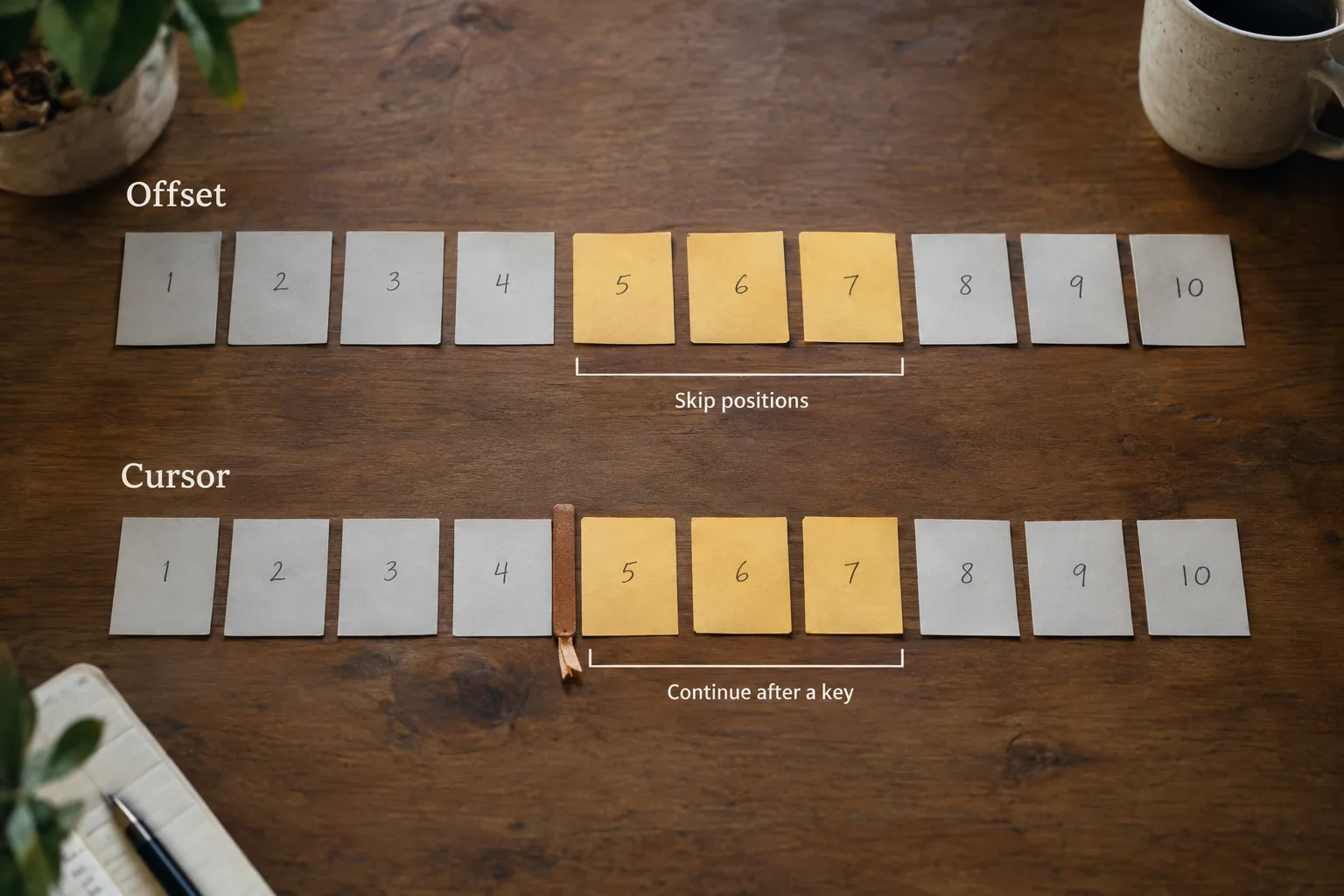
We’ll use offset pagination for this implementation. If you choose keyset cursors instead, define a deterministic ordering key, backward retrieval, token validation, and behavior when the anchor record disappears. Do not assume an encoded ID provides snapshot consistency or authorization.
Check: Write down whether Next means “next batch” or “next record,” and identify the ordering that makes that answer reproducible.
2. Build a small, framework-independent pagination contract
Keep input parsing, URL construction, and navigation availability separate from your UI framework. The following pagination.ts uses a fixed page size of 20 and an application-defined maximum of 1,000 pages. That cap is an example policy, not a db3.ai limit.
We request 21 rows, display 20, and use the extra row as evidence that more results existed when the query ran. A batch containing exactly 20 rows alone cannot tell us whether another page exists.
// pagination.ts
export const PAGE_SIZE = 20;
export const MAX_PAGE = 1000;

export function single(
  url: URL,
  name: string,
): string | undefined {
  const values = url.searchParams.getAll(name);
  if (values.length > 1) {
    throw new RangeError(`Supply ${name} once.`);
  }
  return values[0];
}

export function parsePage(url: URL): number {
  const text = single(url, 'page') ?? '1';
  if (!/^[1-9]\d{0,3}$/.test(text)) {
    throw new RangeError('Invalid page.');
  }
  const page = Number(text);
  if (page > MAX_PAGE) {
    throw new RangeError('Page exceeds the navigation limit.');
  }
  return page;
}

export function pageHref(current: URL, page: number): string {
  if (!Number.isInteger(page) || page < 1 || page > MAX_PAGE) {
    throw new RangeError('Invalid destination page.');
  }
  const next = new URL(current.href);
  if (page === 1) next.searchParams.delete('page');
  else next.searchParams.set('page', String(page));
  return `${next.pathname}${next.search}${next.hash}`;
}

export function pageWindow<T>(fetched: readonly T[], page: number) {
  const more = fetched.length > PAGE_SIZE;
  return {
    page,
    items: fetched.slice(0, PAGE_SIZE),
    hasPrevious: page > 1,
    hasNext: more && page < MAX_PAGE,
    limitReached: more && page === MAX_PAGE,
  };
}
getAll() lets us reject repeated page inputs instead of silently choosing one. Cloning the current URL and changing only page retains other query values, including repeated filter keys. MDN documents these URLSearchParams operations.
Pass pageWindow() a page already checked by parsePage(). Its hasPrevious means an earlier page address is available, not a guarantee that changing data still leaves records there. When limitReached is true, show “Refine your filters to continue,” rather than incorrectly announcing the end of the collection.
Check: Missing page selects page 1. Zero, negative values, decimals, duplicate page keys, and values above 1,000 are rejected. Translate these controlled input failures into your adapter’s documented client-error response.
3. Query an authorized page with db3.ai ActiveRecord
The documented KnowledgeNote model has logical workspace and title fields. Its workspace column mapping belongs to the model, so the feature queries workspace, not workspace_id. The ActiveRecord guide supplies the model and explains its nullable property types and scoped queries.
This function supports an optional exact-title filter and two sort choices: title and title-desc. It validates those values before constructing the query. Place it in notePagination.ts beside the copied model and helper file.
// notePagination.ts
import { KnowledgeNote } from './KnowledgeNote';
import {
  PAGE_SIZE, MAX_PAGE, single, parsePage, pageHref, pageWindow,
} from './pagination';

export async function loadNotePage(
  authorizedWorkspaceId: string,
  current: URL,
) {
  const page = parsePage(current);
  const title = single(current, 'title');
  const sort = single(current, 'sort') ?? 'title';

  if (title !== undefined && (title.length === 0 || title.length > 120)) {
    throw new RangeError('Invalid title filter.');
  }
  if (sort !== 'title' && sort !== 'title-desc') {
    throw new RangeError('Invalid sort.');
  }
  const direction = sort === 'title-desc' ? 'desc' : 'asc';

  const base = KnowledgeNote.where('workspace', authorizedWorkspaceId)
    .select('title');
  const filtered = title === undefined ? base : base.where('title', title);
  const fetched = await filtered
    .orderBy('title', direction)
    .orderBy('id', direction)
    .offset((page - 1) * PAGE_SIZE)
    .limit(PAGE_SIZE + 1)
    .all();

  const result = pageWindow(fetched, page);
  const items = result.items.map(note => {
    if (note.id === null || note.title === null) {
      throw new Error('Expected selected note fields.');
    }
    return { id: note.id, title: note.title };
  });

  return {
    ...result,
    items,
    previousHref: result.hasPrevious ? pageHref(current, page - 1) : null,
    nextHref: result.hasNext ? pageHref(current, page + 1) : null,
    firstHref: pageHref(current, 1),
    navigationLimit: MAX_PAGE,
  };
}
The caller must derive authorizedWorkspaceId from verified access, not blindly forward a query value. The workspace-notes walkthrough deliberately uses this same already-authorized-workspace boundary. Recheck access on every page request.
The query guide documents the field-aware filtering, ordering, bounds, selection, and execution used here. all() returns model instances; the explicit mapper exposes only the selected response properties. The primary key remains available when selecting logical fields. Do not serialize a partial model as if every property had been loaded.
The returned navigation reflects one database read, not a frozen collection across requests. No total-count query is needed for these two controls. If your design needs “page 3 of 12,” add an authorized count with the same filters and define how changing totals should behave.
Check: Seed duplicate titles across two workspaces. Confirm ordering uses ID to break ties, each response contains at most 20 items, and neither items nor next-page detection includes the other workspace’s records. Inspect query performance before raising the navigation cap.
4. Render semantic controls and honest boundary states
Use links when the destination is another addressable page. Use buttons for actions that operate on the current interface without a navigation destination. A client-side router does not require replacing genuine navigation links with clickable containers.
Here is illustrative middle-page HTML for an application route named /notes. In your view, bind previousHref and nextHref from the response and render each link only when its value is non-null. Use your template’s normal escaping rather than assembling HTML strings.
<nav aria-label="Notes pagination">
<a href="/notes?sort=title&page=2" rel="prev">
Previous page
</a>
<span>Page 3</span>
<a href="/notes?sort=title&page=4" rel="next">
Next page
</a>
</nav>
The GOV.UK pagination component provides a useful semantic example: a labeled navigation region, real links, and no Previous link on the first page or Next link on the last. It also recommends including the page number in the document title. For a single-page result, omit the unnecessary pagination region.
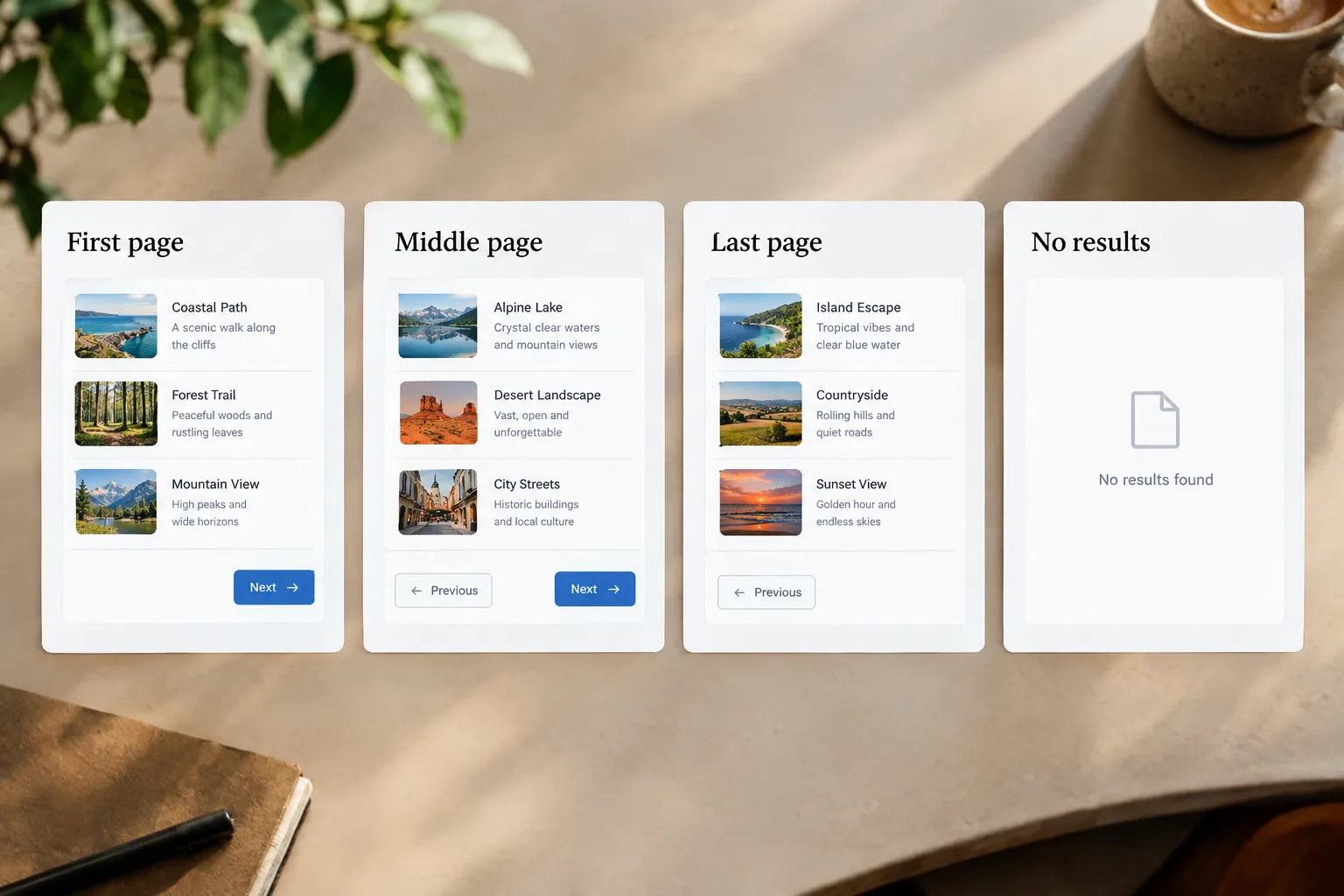
Avoid fake disabled anchors with href="#". If an action genuinely uses a button, use type="button" and native disabled when appropriate. MDN explains native button behavior. Merely setting aria-disabled="true" does not suppress activation; that requires additional behavior.
For record-detail navigation, labels such as “Next note: Deployment checklist” provide more context than an unexplained chevron. Preserve the collection’s filter and ordering context rather than choosing the next globally visible record.
Check: Tab through the controls and activate links with Enter. Unavailable directions must not remain operable. Keep a visible keyboard focus indicator and verify the navigation remains usable when zoomed.
5. Preserve filters, sorting, and browser history
A page number is meaningful only within a collection definition. In this example, the workspace, exact-title filter, sort direction, and fixed page size define that collection.
For an illustrative application URL such as /notes?title=Brief&sort=title-desc&page=3, calling pageHref(current, 4) retains both filter and sort. The helper changes query values, not the backend’s interpretation of them: every supported filter must still be validated and applied before the paging bounds.
When the user changes a filter or sort order, start at page 1. Otherwise, a filter that reduces the collection to a few records can leave the user staring at an empty page 3. GOV.UK’s filtering and sorting guidance recommends applying the change to the whole collection and returning to its first page.
Our data example ignores unrelated query keys. If your API contract requires strict input, reject unknown keys in the HTTP adapter. Do not automatically turn arbitrary query names into model fields or SQL ordering expressions.
For ordinary full-page links, retain native browser navigation. For client-side interception, your router or history integration must restore the URL’s collection state on Back and Forward. MDN’s History API guide explains pushState(), replaceState(), and popstate; updating an address alone does not reload the matching results.
Check: Navigate forward twice, go back once, reload, and copy the address into another tab. Every destination should select the same filters and ordering, subject to current data and permissions.
6. Handle empty pages, mutations, loading, and failures
Define these outcomes separately rather than inferring them from an empty array:
- Empty page 1: Show “No matching notes” and a useful filter-reset action. Neither direction is available.
- Empty later page: Explain that the results changed and offer
firstHref. If you automatically redirect, do it once to page 1 rather than repeatedly requesting earlier pages. - Request still loading: Keep a distinguishable loading state. For an enhanced client, I would retain the last successful results until the replacement succeeds.
- Failed request: Keep the last successful collection and navigation state, show a controlled error, and offer a retry of the same destination. Do not convert a database failure into “No matching notes.”
- Navigation cap reached: Show the refinement message associated with
limitReached. A policy boundary is not proof that no further records exist.
Deletion is not the only source of movement. Renaming a note can move it under title ordering. With separate requests, inserting or deleting a record before an offset can change the next batch’s membership. A unique ordering resolves ties; it does not freeze the collection.
If exact traversal matters, choose an explicit consistency design, such as an immutable ordered dataset or a server-managed result snapshot. A keyset cursor can avoid particular position-shift problems, but does not by itself preserve a historical view of changing records.
For asynchronous navigation, prevent older responses from overwriting newer selections. Track a request identity and commit results, URL, and navigation together only for the current request. Invalidate an in-flight response when Back, Forward, or a filter change establishes a newer destination. Cancellation can reduce wasted work, but your state logic should still reject stale results.
When an in-place update displays “Loading,” “20 notes loaded,” or “No results,” make that status available to assistive technology. W3C’s status-message guidance distinguishes these messages from the results themselves and identifies role="status" as an appropriate technique for relevant updates without moving focus.
Check: Slow one response, request another destination, then let the older response finish last. It must not overwrite the current screen. Also verify focus remains meaningful when a control disappears.
7. Test the complete prev next journey
Use a disposable database and deterministic fixtures. With a page size of 20, the following expectations give the feature an observable contract:
| Matching records | Expected navigation |
|---|---|
| 0 | Page 1 is empty, with no Previous or Next |
| 1 or 20 | Page 1 has no Previous or Next |
| 21 | Page 1 has Next; page 2 has one item and Previous only |
| 40 | Page 2 has 20 items and no Next |
| 41 | Page 2 has both controls; page 3 has one item and Previous only |
The exactly-20 and exactly-40 cases catch implementations that mistake a full batch for evidence of another page. The extra-row query should avoid that false Next link.
Test the pure helpers independently: malformed and duplicate page values must fail; page 1 should omit its query key; changing pages must retain filter values. At the configured cap, verify limitReached produces a refinement message rather than a misleading “last page” claim.
Then test the database boundary. Include duplicate titles, both sort directions, an exact-title filter, another workspace’s records, and an authorization change between requests. On an unchanged dataset, collecting IDs while navigating every page should yield each matching authorized ID once.
Finally, test the interface rather than stopping at the JSON response. Cover browser Back and Forward, a deleted last-page item, a failed request followed by retry, and out-of-order responses. Use keyboard and screen-reader checks to confirm link names, boundary behavior, focus handling, and status announcements.
These are adapted examples checked against the documented preview APIs, not code executed in this article’s preparation. Type-check and run them against your matching packages. The workspace-notes walkthrough supplies the disposable database setup; extend its fixtures instead of using production credentials.
Put the controls on a working feature
You now have a defined pagination contract, a bounded workspace-scoped query, and clear rules for navigation and recovery. The next useful step is to integrate that response into one real list view and run the 21-record and 40-record checks through the browser.
Start with our workspace-notes walkthrough, then add the pagination files beside its model. Keep authentication and membership checks at the server boundary, and let the returned contract drive the controls.
Sources
- db3.ai: Installation and preview package setup
- db3.ai: ActiveRecord
- db3.ai: Query with logical fields
- db3.ai: Workspace-notes walkthrough
- PostgreSQL 18: LIMIT and OFFSET
- GraphQL Cursor Connections Specification
- GOV.UK Design System: Pagination
- MDN: URLSearchParams
- MDN: Working with the History API
- MDN: The button element
- MDN: aria-disabled
- W3C: Understanding Status Messages
Recommended Reads
- Fetch Table Explained: SQL SELECT, FETCH, and TypeScript: Understand the bounded data retrieval underneath a paginated list.
- What Are Params? A TypeScript Guide to Function, Route, and Query Parameters: Clarify and validate the URL inputs that select a page.
- How to Create TypeScript APIs With Clear Boundaries, Authentication, and Tests: Integrate the feature behind an authenticated, intentionally shaped HTTP contract.