23 October 2026
Is Node.js a Framework? Runtime vs. Framework Explained

TL;DR
No, Node.js is not a framework. It is the runtime that executes JavaScript outside a browser and supplies APIs for work such as networking and file access. A web framework runs on that foundation and helps organize requests, routes, validation, and application behavior. TypeScript adds a language and type-checking layer, not a replacement runtime. Choose the framework by the work your product needs beyond executing code.
A team can say it is “building in Node.js” and mean several different things: using the runtime, writing an API with Express, or developing a larger TypeScript application with authentication and background jobs. Those descriptions are compatible, but they are not interchangeable. Getting the layers right makes it easier to estimate what your team must still implement and operate.
Table of contents
- Is Node.js a framework? The direct answer
- What does Node.js give you without a framework?
- What does a framework add on top of Node.js?
- Where does TypeScript fit?
- A concrete example: add an application layer with db3.ai
- When should you use Node.js directly instead of a framework?
- Frequently asked questions
- Next step
- Sources
- Recommended Reads
Is Node.js a framework? The direct answer
Node.js is a JavaScript runtime environment, not a web framework, programming language, or standalone library. The Node.js project describes it as an asynchronous, event-driven runtime and shows that you can build an HTTP server with its own node:http module. The language is JavaScript; the runtime provides an environment in which server-side JavaScript executes. A framework can use that environment without becoming part of its definition.
I find it helpful to separate four layers:
| Layer | Its job | Example |
|---|---|---|
| Language | Express the program and, with TypeScript, check its types during development | JavaScript or TypeScript |
| Runtime | Execute supported code and provide system APIs | Node.js |
| Framework | Organize recurring application concerns above the runtime | Express for HTTP routing; a broader application framework for additional services |
| Your application | Define product-specific rules, permissions, responses, and workflows | Your API routes, models, and business logic |
These are conceptual layers, not four mandatory packages. You can write a useful Node.js program without a web framework, and a framework does not relieve you of defining your own product rules. The visual below shows which layer supports which.

That distinction also corrects a common phrasing error: “Node.js framework” usually means a framework that runs on Node.js, not that Node.js itself is one. Express describes itself as a routing and middleware web framework. The phrase names its relationship to Node.js, not a change in what Node.js is.
What does Node.js give you without a framework?
Node.js runs the V8 JavaScript engine outside the browser and exposes runtime facilities such as the standard HTTP, filesystem, and networking APIs. Its event loop coordinates asynchronous work; many I/O operations can progress without keeping JavaScript blocked while waiting for a response. That is a runtime capability, not an HTTP route convention or an authentication policy. Node's introduction and event-loop explanation describe these separate responsibilities.
With node:http, you can create a server that receives a request object and writes a response. This is enough for a small endpoint or a custom protocol boundary. But as paths, methods, input formats, and errors multiply, you need to decide how to match URLs, parse request data, validate untrusted values, send consistent errors, and dispose of resources. You can implement those choices yourself. Node.js does not dictate the application structure for them. The official Node.js introduction includes a framework-free HTTP server.
Node.js also participates in the npm package ecosystem, where you can add third-party dependencies. Keep npm distinct from Node.js itself: npm is the package manager, not a routing framework automatically installed into your application's design. Being able to install an authentication library does not mean your runtime has chosen your identity model or permission rules.
There is an operational limit worth remembering. Non-blocking I/O does not make expensive synchronous JavaScript work disappear. A long-running callback can delay other work on the event loop; move genuinely heavy work behind a deliberate worker or process boundary when the workload requires it. Node's event-loop guide discusses how long callbacks delay subsequent phases.
What does a framework add on top of Node.js?
A web framework gives requests a more useful application-level shape. Express, for example, maps an HTTP method and route path to a handler with app.get() or app.post(). Its middleware can inspect or modify a request, end a response, or pass control to the next handler. Those are higher-level conventions built above the runtime's request and response primitives. Express documents routing and the middleware lifecycle separately.
Other frameworks make different promises. A framework may add request schemas, typed handler patterns, modular organization, testing utilities, or integrations with authentication and data. As a concrete contrast, Fastify 5 documents JSON Schema-based route validation. TypeScript types alone do not validate an HTTP client's actual input; the route needs a runtime check or an explicit validation policy. The larger point is not that every framework includes the same validator. It is that frameworks can provide a repeatable place to make that decision.
An application framework may extend beyond HTTP into records, files, sessions, queues, scheduling, and AI services. Those facilities are not properties of Node.js, and they are not guaranteed by the word “framework.” Even when a framework exposes a queue API, your application still needs a configured backend, workers, retry rules, and an owner for operations. Ask what the chosen framework supplies directly, what it integrates, and what your team runs separately.
Where does TypeScript fit?
TypeScript helps us express and check code before deployment, while Node.js supplies the execution environment for a Node-hosted server. In many applications, a build tool or TypeScript runner transforms .ts files for execution. There is an important qualification: modern Node.js can also run files containing erasable TypeScript syntax by stripping the types, so “TypeScript must always be compiled first” is no longer accurate. Node.js does not type-check those files, and syntax requiring generated JavaScript needs an appropriate transformation step. Node's TypeScript guide spells out the version and syntax constraints.
That gives a practical answer to “Is Node.js a TypeScript framework?” No. Running a TypeScript file does not give a project HTTP routing, runtime validation, shared application structure, or background-job conventions. It only changes how supported source reaches the JavaScript runtime. Keep a separate type-checking step in your development or CI workflow, and test network inputs at runtime, regardless of whether you use native type stripping or a build tool. Node explicitly distinguishes type stripping from type checking.
A concrete example: add an application layer with db3.ai
Consider a small greeting endpoint. At the Node.js level, we need a process that accepts HTTP requests. At the HTTP-framework level, we need a route and a parameter check. At the application-framework level, we may want shared configuration, request-local state, a health route, and orderly cleanup. This is a useful way to see where one tool stops and another begins.
Our minimal HTTP app guide demonstrates that boundary using Fastify for HTTP and @db3.ai/app for the application service hub. It does not imply that Node.js has been replaced or that every db3.ai service is needed for one greeting. In this example the Fastify route validates a path parameter, the framework App holds configuration and request context, and the consuming application owns the greeting behavior. The documentation page below shows how to begin with the shipped example files.
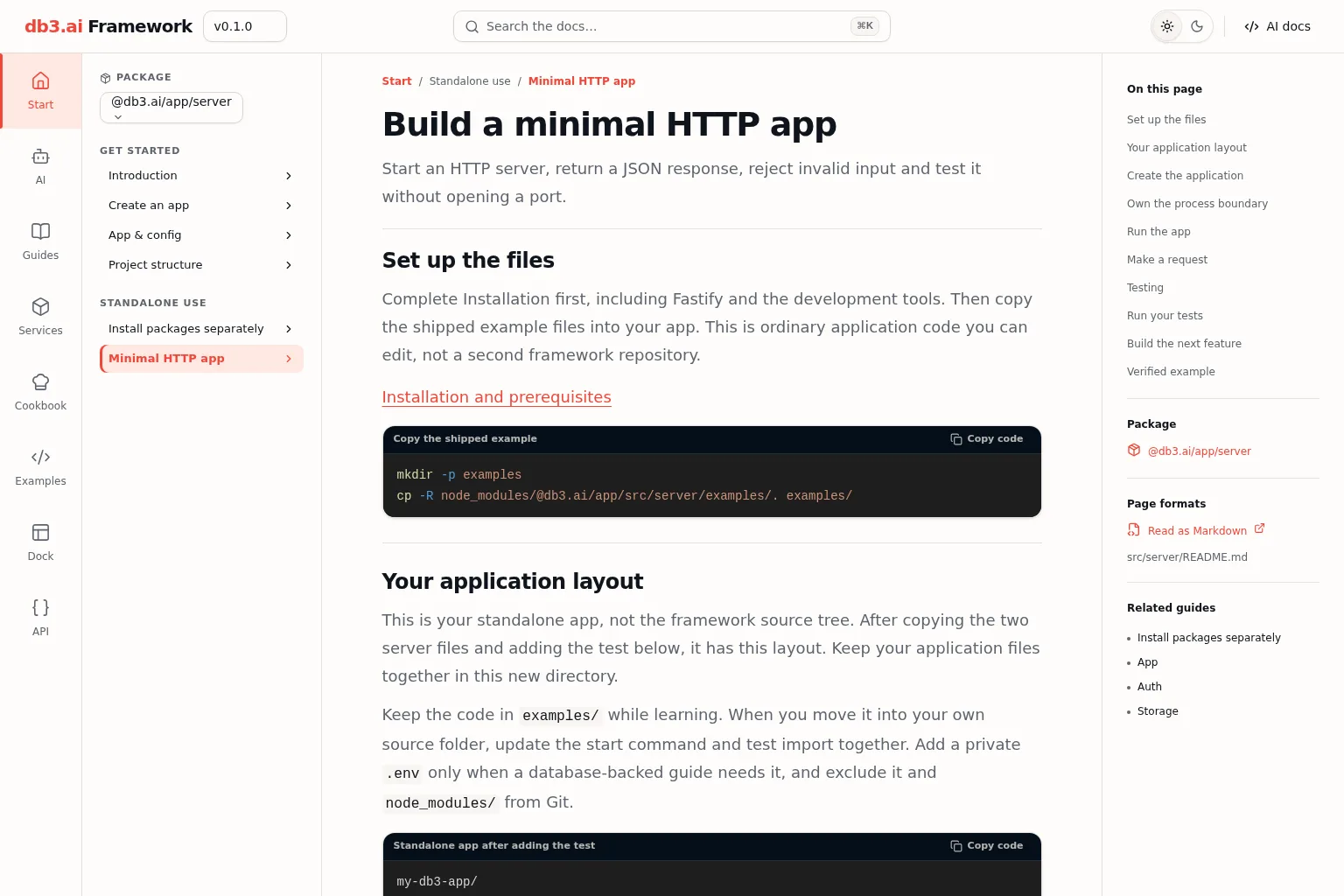
Setup and limits: This example follows the documented Node.js 24+, Fastify 5, TypeScript, and Vitest walkthrough. The current installation guide says @db3.ai/app and its matching @db3.ai/pure are preview packages installed together from maintainer-supplied tarballs; do not assume a public npm install is available. Follow that guide to create a standalone application, obtain matching artifacts, install its HTTP and development dependencies, and copy the shipped examples/ files before using the test. The excerpt below reproduces the documented examples/createFirstServer.ts factory:
import Fastify, { type FastifyInstance } from 'fastify';
import { App, registerHttpErrorHandler } from '@db3.ai/app/server';
import { registerHealthRoute } from '@db3.ai/app/health/fastify';

export function createFirstServer(greeting = 'Hello'): FastifyInstance {
  const application = new App({
    config: { greeting },
    health: { service: 'first-application' },
  });
  const server = Fastify();
  registerHttpErrorHandler(server);
  server.addHook('onClose', async () => {
    await application.close();
  });
  registerHealthRoute(server, { app: application });
  server.get<{ Params: { name: string } }>('/hello/:name', {
    schema: {
      params: {
        type: 'object',
        required: ['name'],
        properties: {
          name: { type: 'string', minLength: 1, maxLength: 80 },
        },
      },
    },
  }, async request => application.requestContext.run(async () => {
    application.requestContext.set('requestId', request.id);
    return {
      message: `${application.config.get<string>('greeting')}, ${request.params.name}!`,
    };
  }));
  return server;
}
The factory deliberately does not listen on a network port. The guide's separate process entry point owns listening and shutdown. For an isolated check, save this test as tests/server/firstApplication.test.ts in the documented directory layout:
import { expect, it } from 'vitest';
import { createFirstServer } from '../../examples/createFirstServer';

it('responds and rejects an overlong route parameter', async () => {
  const server = createFirstServer('Welcome');
  try {
    const greeting = await server.inject('/hello/Ada');
    expect(greeting.statusCode).toBe(200);
    expect(greeting.json()).toEqual({ message: 'Welcome, Ada!' });

    const invalid = await server.inject(`/hello/${'x'.repeat(81)}`);
    expect(invalid.statusCode).toBe(400);
  } finally {
    await server.close();
  }
});
Run npx vitest run tests/server/firstApplication.test.ts after completing that setup. The guide documents these response expectations and the consumer test, but we have not executed this adapted excerpt here. It exercises a route and a failure case without opening a socket or connecting to SQL; it does not implement user authentication, persistent records, production TLS, or a durable job. The application lifecycle reference also warns that the active App is process-global. Do not create a new one per request or run multiple active app factories concurrently in one test process; close owned resources before the next test.
That is the useful architectural lesson: Node.js runs the code, Fastify handles the HTTP contract, @db3.ai/app supplies application services, and your application still chooses its own routes, permissions, and product behavior. Our application-structure guide keeps those features in the consuming project rather than hiding them in the framework.
When should you use Node.js directly instead of a framework?
For a one-off script, a tiny health endpoint, or a specialized server with a carefully controlled surface, Node.js standard APIs may be enough. If you already have well-understood internal helpers for HTTP, validation, and deployment, adding a framework only for its name is unlikely to help. Document the error and shutdown behavior you implement yourself, so a small service does not quietly become an unmaintained framework.
For an API with several endpoints, a focused HTTP framework can spare you repeated routing and request-lifecycle work. Ask whether it validates inputs at runtime, how errors reach clients, how you test handlers without a live socket, and which conventions your team must establish. Express's routing and middleware model is one possible answer, not the only one. Its official guides show exactly those HTTP abstractions.
For a full-stack product, list the work beyond routes: identity, record ownership, data migrations, storage, delivery, monitoring, and who deploys the UI. For background or AI workflows, add job durability, retry behavior, credential ownership, and where workers run. A broader application framework can put some of those capabilities behind consistent APIs, but it cannot invent your authorization rules or operate your infrastructure for you. The db3.ai introduction describes Auth, Storage, Queue, Scheduler, and AI guides as distinct paths beyond its first HTTP example.
My decision check is simple:
- Name the boundary: Is the project a script, an HTTP service, or a product whose requests trigger longer-lived work?
- List the recurring work: How will you handle inputs, errors, identity, data, files, and tests?
- Identify who operates it: Will the team run a database, queue workers, scheduled tasks, and external providers?
- Build one representative feature: Test a valid request, a rejected request, and clean shutdown before committing to more abstractions.
If the answer is “we only need to execute JavaScript,” start with the runtime. If the answer includes recurring application behavior, choose a framework for the specific responsibilities it removes, not because you mistook Node.js for one.
Frequently asked questions
Is Express the same thing as Node.js?
No. Express is a web framework; Node.js is the runtime on which a conventional Express server executes. Express adds route matching and middleware, while Node.js provides the underlying execution environment and HTTP facilities. Express explains its routing and middleware model.
Do I have to use a framework to build a Node.js web server?
No. Node's introductory server example uses its built-in node:http module. A framework becomes useful when its request handling, conventions, or application services are worth adopting for your project; it is not a prerequisite for listening to HTTP requests.
Does Node.js running TypeScript make it a TypeScript framework?
No. Node's native TypeScript support strips supported type syntax without type-checking. It does not supply project-specific routing, validation, authentication, or test conventions. Keep execution, static checking, and application structure as separate decisions.
Next step
If you are choosing a foundation for a TypeScript product, sketch one real request from input to validated response, then list every step that continues after the response. To see the layers in a working example, begin with our documented minimal HTTP app and its test. Add data, identity, or background work only when your feature requires it, using the relevant framework guides rather than assuming those concerns arrive automatically with Node.js.
Sources
- Node.js: About Node.js
- Node.js: Introduction to Node.js
- Node.js: The event loop
- Node.js: Introduction to npm
- Node.js: Running TypeScript natively
- Express: Routing
- Express: Using middleware
- Fastify 5.6: Validation and serialization
- db3.ai: Installation and preview status
- db3.ai: Build a minimal HTTP app
- db3.ai: App lifecycle
- db3.ai: Your application structure
- db3.ai: Build an app with db3.ai
Recommended Reads
- Node.js Web Frameworks Compared: Express, Fastify, NestJS, AdonisJS, and db3.ai: Compare concrete framework choices after separating the runtime from the framework.
- Bodyparser Explained: How Request-Body Parsing Works in TypeScript APIs: Follow the HTTP request into parsing and validation.
- 6 TypeScript Backend Frameworks to Compare for Your Next Application: Extend the decision from HTTP to wider backend architecture.