13 October 2026
Working Queue Explained: Team Work vs. Background Jobs

TL;DR
A working queue is a way to hold pending work until someone or something takes responsibility for it. A team queue helps people triage and assign requests; a software work queue lets workers claim and process jobs. For background jobs, I would define the work item, store a durable business identity, run workers on the right queue, and plan for retries, duplicate effects, and visible failures. Enqueueing is not the same as finishing.
A customer clicks “generate export.” The request returns quickly, but the export still needs to happen. Meanwhile, a support agent may see that customer's question in a list of unassigned requests. Both lists are called queues, yet they have different owners, failure modes, and definitions of completion. If your team says “put it in the working queue,” the first question should be: who takes the next item, a person or a worker process?
Table of contents
- What is a working queue?
- How a software working queue moves a job
- A small db3.ai example: route a report to a worker
- Make the working queue reliable when the happy path breaks
- When a queue is the wrong starting point
- Frequently asked questions
- Sources
- Recommended Reads
What is a working queue?
In plain language, a working queue holds tasks that are ready, waiting, or in progress, so they can be assigned and completed in an orderly way. The phrase is not one universally defined software component. It might describe the list an operations team works from, an application job store, or a platform-specific mechanism. For instance, Linux workqueues run deferred kernel work; they are not the same as an application's persistent job queue.
Two everyday interpretations matter most to product engineers:
| Question | Operational team queue | Software work or job queue |
|---|---|---|
| What enters it? | A support request, review, or other human task. | A small job record or message describing executable work. |
| Who takes ownership? | An agent or team, sometimes after triage. | A worker process eligible to consume that queue. |
| What guides selection? | Filters, urgency, skills, and service goals. | Queue routing, availability, worker capacity, and the system's claim rules. |
| What proves completion? | The team's business status and resolved request. | A settled processing attempt plus a verified application result. |
| What needs recovery? | Unassigned, overdue, or reopened requests. | Expired claims, retries, terminal failures, and possibly duplicate effects. |
The distinction is observable in product documentation. Jira Service Management queues organize customer requests for agents to view, triage, and assign. RabbitMQ's work-queue tutorial describes distributing time-consuming tasks among background workers. Neither definition makes the other incorrect.
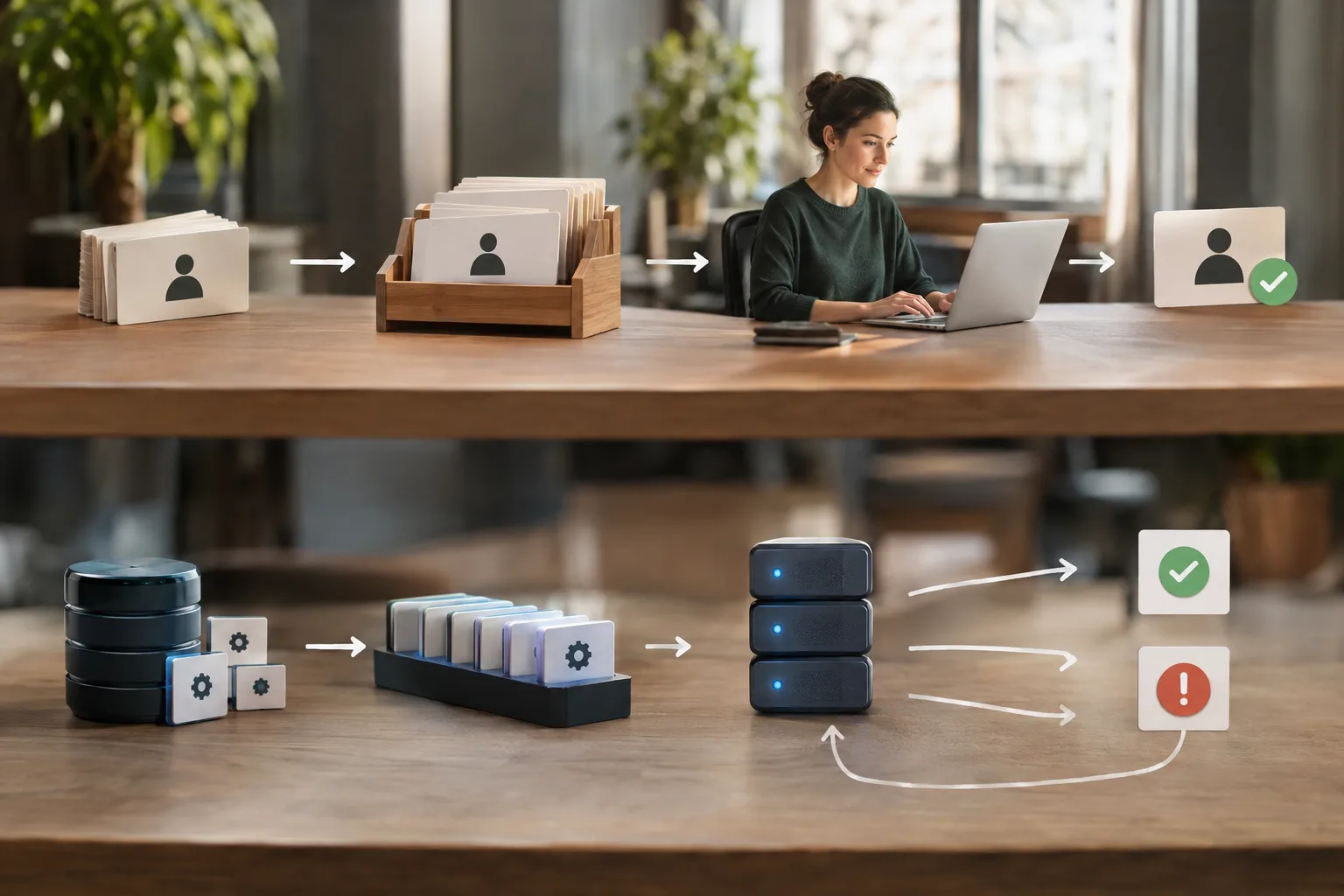
A human queue can trigger a software queue. For example, approving an export request might dispatch an export job. Keep the human decision, queued attempt, and finished export as separate records if users need to know which stage is blocking them. A queue view that says “assigned” does not prove the file exists; a job ID does not prove anyone approved the request.
How a software working queue moves a job
The smallest useful model has a producer, stored work, a worker, and an outcome. Imagine a user requests an export for report revision report-42-v3. The producer records an application-owned report request, then enqueues the report's stable identifier. A worker later loads the source data and creates an artifact. The user checks the report's application status, not the queue's internal row ID. Microsoft's background-job guidance makes the same distinction between starting asynchronous work and communicating its result.
A practical job lifecycle is:
- Enqueue: Persist a job name and JSON-safe data, ideally a stable business ID and revision rather than a request object, connection, or transient credential. Decide how a business-record write and enqueue are reconciled if one succeeds without the other.
- Route: Select a named queue when workloads need different workers or capacity. A
reportsjob will not advance if every worker listens only tonotifications. - Claim: An eligible worker reserves an available job for an attempt. Its claim must have an ownership and timeout policy so abandoned work can be recovered.
- Execute and settle: On success, record or acknowledge the attempt. Independently persist the customer-visible result; a response to the original request cannot wait around to be the sole record of completion.
- Retry or defer: A transient failure may release the job for another attempt after backoff. A deliberate delay can hold work until later. Set a budget for attempts and for how long the result stays useful.
- Inspect a terminal failure: When attempts end, preserve enough context for an authorized operator to diagnose, repair, and deliberately replay work where appropriate.

That sequence is a model, not a promise that every queue implements the same settlement or retry semantics. RabbitMQ, for example, explains how manual acknowledgements allow redelivery when a consumer dies before acknowledging; it also warns that declaring durable messages alone is not a complete publisher-confirmation strategy. The RabbitMQ work-queue guide is a useful concrete contrast to the application-level job lifecycle documented by db3.ai Queue.
The payload is an identity, not a snapshot of the request
A stored job may outlive the HTTP request and may be restored by a different process after a deployment. Pass reportId and, where needed, the intended revision or tenant-scoped identity. Have the worker load authorized application data from its normal services and validate the stored payload when it is restored. Never place a live request, open database session, or secret bearer token in the job simply because it was available at enqueue time. The db3.ai Queue guide explicitly uses JSON-safe job data and constructor validation on rehydration.
Keep one important distinction: the business key names the promised operation, while the queue ID identifies a stored attempt or record. A failed job replay can receive a new queue ID without becoming a new customer request. If two attempts refer to report-42-v3, the application must decide whether they may both publish a result. That decision cannot safely depend on whether their queue IDs differ.
A small db3.ai example: route a report to a worker
Here is the application-side handoff after an authenticated action has authorized a report. It uses the GenerateReportJob class from the db3.ai Queue guide, so this is not a standalone installation or a replacement for that guide's worker setup. The public Queue API documents the dispatch() overload and these per-job options.
import { app } from '@db3.ai/app/server';
import type { QueueJobId } from '@db3.ai/app/queue';
import { GenerateReportJob } from './jobs/GenerateReportJob';

// Call from an authorized service after the db3 application has booted.
export async function queueAuthorizedReport(
  reportId: string,
): Promise<QueueJobId> {
  return app().queue.dispatch(
    new GenerateReportJob({ reportId }),
    {
      queue: 'reports',
      maxTries: 4,
      backoff: {
        strategy: 'exponential',
        initialSeconds: 15,
        maxSeconds: 300,
        jitter: true,
      },
      retryUntilSeconds: 3_600,
    },
  );
}
The job constructor in the linked guide validates reportId; its starter handle() only logs the ID. To produce a real report, replace that handler with your application's data loading and repeatable artifact write. Configure a durable driver, apply the database queue migrations if using that driver, register the job in the bootstrap shared by HTTP and worker processes, and supervise a worker consuming reports. Authorization, the business status record, actual report generation, and atomic handoff are intentionally omitted. The returned ID proves dispatch, not completion. This excerpt follows the documented API but has not been executed in your application. The complete db3.ai Queue guide supplies the setup and runnable example.
This small example exposes a design decision often buried under framework setup: four attempts and a one-hour ordinary-retry window are illustrative policy choices, not defaults that fit every job. If a report becomes obsolete after 10 minutes, shorten its deadline. If it is part of an auditable period close, plan explicit repair rather than silently discarding a late result.
Make the working queue reliable when the happy path breaks
Retries can repeat an external effect
A worker can upload a file or call a provider, then crash before recording queue success. A later worker may repeat the same logical operation. Microsoft advises designing background jobs for repeated execution; db3.ai likewise describes lost-lease outcomes as ambiguous. A lease coordinates the queue record. It cannot undo an already completed API call.
For a generated artifact, write under a stable report revision and conditionally publish the result so a duplicate attempt does not create a second visible export. For a payment, email, or other external action, use a provider-supported idempotency key when one exists and reconcile timeouts before repeating a possibly completed action. Decide what happens when an old attempt finishes after a newer revision; a stable filename alone will not prevent stale output overwriting fresh output.
The producer can lose the handoff
Suppose you commit the report request, then the process stops before it enqueues the job. Your business database says “requested,” but the queue has no work. Reversing the order risks a worker seeing a job whose business record was never committed. Where losing this handoff is unacceptable, evaluate a transactional outbox written alongside the business change and a separately operated relay. AWS's transactional outbox guidance explains both the dual-write gap and why an outbox consumer still needs duplicate handling. The db3.ai report recipe also says an ordinary model transaction does not include every queue driver or external file write; do not assume dispatch() is automatically atomic with unrelated application changes.
Backpressure needs a capacity decision
A backlog is not automatically bad: a queue absorbs a burst so workers can process jobs at a controlled rate. It becomes a product problem when the oldest job waits longer than the user's useful deadline. Track enqueue-to-start age, attempt duration, retry counts, terminal failures, and the application result. Then ask whether you need more worker capacity, a separate named queue for slow work, a lower producer rate, or a downstream provider limit. RabbitMQ specifically warns that a queue can fill while all workers are busy and recommends monitoring it in its work-queue tutorial.
More workers can also overload a database or external API. Separate queue routing from global rate control: staffing reports with more workers increases potential report throughput but does not establish a fleet-wide quota for a provider. In db3.ai, named queues and matching workers are documented in the Queue guide; size the processes and downstream limits for your own deployment. An idle worker listening on the wrong queue says nothing about the backlog on the right one.
A useful incident drill is to stop a worker after a harmless side effect but before it records success, restart it, and check the customer-visible artifact and the failure history. Then submit a permanently invalid payload. Can an operator distinguish work waiting for retry from a terminal failure, and can they repair its cause before replaying? db3.ai's Queue API exposes failed-job inspection and linked replay, but it cannot decide whether your business action is safe to repeat.
When a queue is the wrong starting point
I would use a job queue when work can finish independently of the request, needs persistence or retries, and has a clear unit of execution. A small disposable calculation needed by the current response may be simpler to complete inline. A human approval belongs in a team or product workflow until a person's decision actually authorizes executable work; starting a worker early is not a substitute for that decision.
A scheduler chooses when work becomes due, particularly for recurring calendar obligations; a queue chooses how an already created job is claimed and recovered. A one-time delay can be a queue option, but a daily business report also needs an occurrence identity and a missed-run policy. An event signals that something happened and may have multiple consumers; one competing-worker queue normally assigns a particular job to one consumer rather than broadcasting independent copies. db3.ai's Queue guide distinguishes Queue from Events, Scheduler, and Flows, while Microsoft's background-job guidance separates event-driven from schedule-driven triggers.
Before you adopt a working queue for a product feature, ask five questions: Who owns the task? What durable identifier survives the request? Which worker or person can take it? What happens after a crash or duplicate attempt? Where can a customer and an operator see the actual result? If a single retryable handler cannot express the answer because the work spans approvals, long waits, and dependent steps, model those states explicitly rather than hiding them inside a single job.
Frequently asked questions
Is a work queue the same as a job queue?
In software discussions, the phrases often overlap: producers place tasks in a queue and workers process them. “Working queue” can also mean a human team's filtered task list. Ask about ownership and completion before treating the terms as synonyms; Jira's team queues and RabbitMQ's worker queue illustrate the two meanings.
Does taking a job off the queue mean it is done?
No. Claiming starts an attempt; a worker might fail, lose its claim, or complete an external action without recording success. A queue-level success also does not necessarily mean your application stored the customer-visible result. db3.ai documents claim and outcome separately, including retry, failure, and lost-lease results.
Does a working queue guarantee first-in, first-out processing?
Do not assume so. Delays, different job durations, multiple workers, retries, and named queues can change the order in which results become visible, even if available items were selected in insertion order. If order matters to the business, enforce it around the business identity and test it under retries. RabbitMQ's work-queue tutorial shows how competing workers can finish at different rates even when delivery initially alternates between them.
Next step: Choose one small job whose result you can safely reproduce. If your application already uses @db3.ai/app, follow the Queue guide to run its producer and matching worker, then use the Queue API reference when adapting retry and failure inspection to your own business identity. Test the crash boundary before promising users that a successful enqueue means their result is ready.
Sources
- Atlassian Support: What are queues?
- RabbitMQ: Work Queues tutorial
- Linux Kernel documentation: Workqueue
- Microsoft Learn: Best practices for background jobs
- AWS Prescriptive Guidance: Transactional outbox pattern
- db3.ai Framework: Queue guide
- db3.ai Framework: Queue API reference
- db3.ai Framework: Move a report out of the request
Recommended Reads
- TypeScript Job Queue: How to Choose for Retries, Concurrency, and Recovery, for selecting a queue implementation once the work model is clear.
- Background Task Scheduling: A Reliability Guide for Backend Jobs, for recurring work, missed runs, and due-occurrence policy.
- Message Queue TypeScript: 5 Options for Reliable Jobs and Events, for deciding whether one work queue or event distribution fits your system.